CATIA Composer – Transforming Engineering Data into Interactive Technical Documentation
- Jayesh Darji
- March 12, 2026
CATIA Composer is a powerful desktop application from Dassault Systemes designed to transform engineering 3D CAD data into highly intuitive and interactive technical documentation. In today’s engineering and manufacturing environments, clear product communication is as important as design accuracy. Traditional documentation methods using 2D drawings, screenshots, and manually created illustrations often lead to errors, misinterpretations, and delays. CATIA Composer eliminates these issues by allowing organizations to directly reuse existing CAD data from platforms such as CATIA V5, 3DEXPERIENCE, SOLIDWORKS, and standard neutral formats like STEP, IGES, and JT, without requiring design rework or CAD expertise. This enables non-CAD users including manufacturing engineers, technical authors, service teams, and training departments to work efficiently with real engineering models.
One of the biggest advantages of CATIA Composer is its associative link capability. When there is an engineering change in the CAD model, documentation can be updated automatically, ensuring consistency between product evolution and technical publications. This significantly reduces effort, cost, and time while minimizing human dependency and interpretation errors. With CATIA Composer, organizations can create various types of deliverables, including manufacturing assembly instructions, service and maintenance manuals, spare parts catalogues, technical illustrations, interactive 3D content, training material, and even marketing visuals. Its lightweight environment and user-friendly interface allow users to generate exploded views, step-by-step assembly sequences, BOM tables, balloons, leader annotations, and safety indicators with high visual clarity.
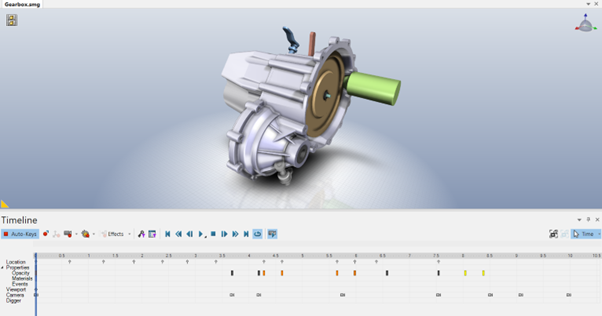
Fig- Dynamic assembly and Disassembly Sequence using timeline-based editing and keyframe controls
CATIA Composer also includes a robust animation engine that allows users to create dynamic assembly and disassembly sequences, maintenance steps, and operational demonstrations using timeline-based editing and keyframe controls. Visual techniques such as ghosting, transparency, section views, and cutaway animations enhance understanding of complex products. Technical illustration tools further enable generation of vector graphics, high-resolution images, and simplified line visuals suitable for manuals and compliance documentation.
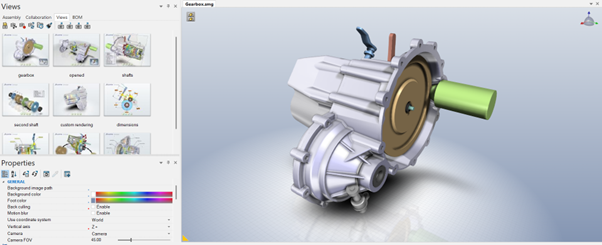
Fig- CATIA Composer Interface Displaying the Views Pane, Properties Panel, and 3D Model Workspace
Composer automatically utilizes CAD metadata such as part numbers, descriptions, materials, and revisions, making BOM management and ballooning fast, accurate, and associative.
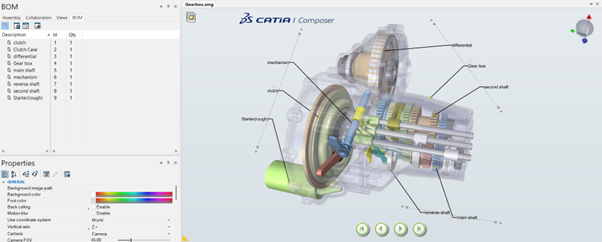
Fig- CATIA Composer Environment Showing BOM Management and Component Identification
The typical workflow in CATIA Composer begins with importing CAD data and defining product views such as exploded assemblies, service positions, and operational states. Users then apply annotations, BOM information, callouts, measurements, and procedural details. Animations or illustrations are created next, followed by publishing to various formats such as PDF, HTML, images, videos, and interactive SMG files. This flexibility allows organizations to distribute content digitally or traditionally based on requirement.
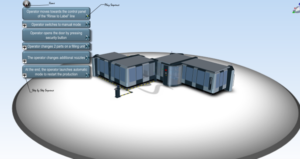
Fig: Modelled View of the component in Composer
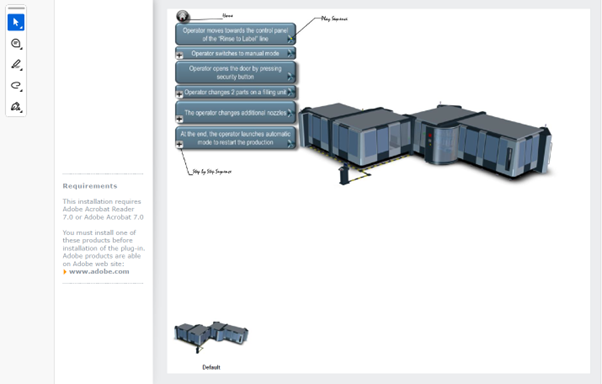
Fig: PDF Documentation Export from CATIA Composer
Compared to traditional documentation methods that rely on static screenshots and manually recreated illustrations, CATIA Composer enables the creation of interactive and dynamic technical content. The image illustrates how different product variants can be displayed and integrated within the main 3D model environment. When a specific variant is selected, the corresponding configuration is automatically shown in the central model view, allowing users to visualize design variations clearly. This interactive capability helps technical authors and engineers present multiple product configurations within a single documentation environment, improving clarity, accuracy, and user understanding while reducing the effort required to create separate illustrations for each variant.
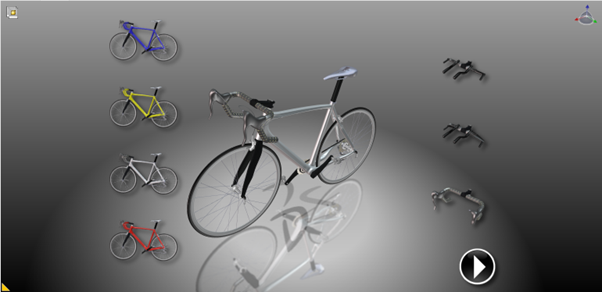
Fig- Interactive Product Variant Selection in CATIA Composer
To gain maximum benefit, organizations should maintain structured CAD assemblies, ensure consistent metadata usage, plan documentation strategy early, and use Composer features like named views, layers, and controlled animations effectively. CATIA Composer is widely adopted across industries including automotive, aerospace, heavy machinery, industrial equipment, consumer electronics, and medical devices, where accurate assembly, manufacturing, and service communication is critical. Integrated within the 3DEXPERIENCE ecosystem, it supports managed data environments, secure collaboration, engineering change management, and lifecycle connectivity, creating a single source of truth between design and documentation.
In conclusion, CATIA Composer is more than a visualization tool; it is a strategic communication platform that bridges design, manufacturing, service, training, and customer communication. It enables organizations to produce high-quality, interactive, easily updatable technical content directly from engineering data, thereby reducing errors, improving productivity, supporting faster manufacturing readiness, enhancing service efficiency, and strengthening overall product communication quality. In a world where clarity equals reliability, CATIA Composer plays a vital role in delivering accurate and visually intelligent product information throughout the product lifecycle.

Recent Posts
-

From Prototypes to Production: How Additive Manufacturing is Shaping Atmanirbhar Bharat
The conversation around additive manufacturing (AM) in India has evolved considerably over the past decade. What was once viewed primarily as a prototyping technology is…
-
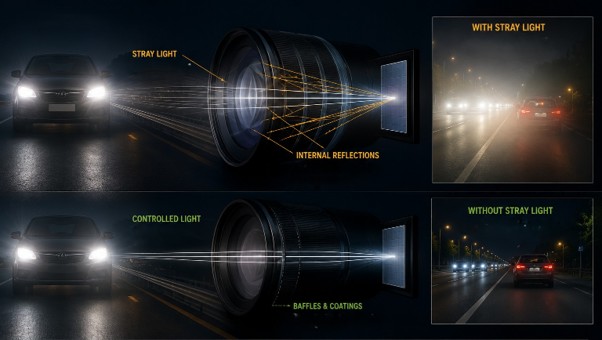
Identify Stray Light in Imaging Systems with LightTools
Stray light is undesired light radiation that interacts with the components of a system and degrades its performance by generating noise, that significantly reduces image…
-
Redefining the Riding Experience with RAMSIS
In two‑wheeler design, comfort and safety start with the rider. RAMSIS (Realistic Anthropometric Mathematical System of Interior Comfort Simulation) is an ergonomic simulation platform that…
-
Enhancing Product Understanding through 3D Technical Illustrator
The 3D Technical Illustrator role within the 3DEXPERIENCE Platform enables organizations to transform complex engineering data into clear, interactive, and visually rich technical documentation. In…
-

Transforming Physical Parts into Digital Models with CATIA 3DEXPERIENCE Reverse Engineer role
Reverse engineering has become a critical capability in modern product development, especially when working with legacy components, competitor benchmarking, or physical prototypes that lack digital…
-
Fixing Search Service Down Issue in 3DEXPERIENCE Platform
Search is one of the most critical features in the 3DEXPERIENCE platform. If the search service goes down, users cannot find objects, documents, or data—impacting…
-
Common Installation Errors and How to Fix Them in 3DEXPERIENCE
The 3DEXPERIENCE Platform is a powerful solution used by industries worldwide for product lifecycle management (PLM), simulation, and collaboration. However, installing 3DEXPERIENCE—especially on-premise—can be complex…
-
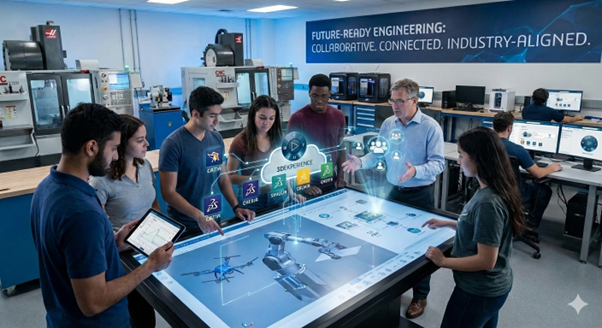
From Classroom to Industry: Empowering Future Engineers with the 3DEXPERIENCE Platform
In today’s fast-evolving engineering and design landscape, educational institutions must go beyond conventional CAD teaching methods. While standalone tools like CATIA V5, SOLIDWORKS, or traditional…
- Jayesh Darji
- March 12, 2026
CATIA Composer – Transforming Engineering Data into Interactive Technical Documentation
CATIA Composer is a powerful desktop application from Dassault Systemes designed to transform engineering 3D CAD data into highly intuitive and interactive technical documentation. In today’s engineering and manufacturing environments, clear product communication is as important as design accuracy. Traditional documentation methods using 2D drawings, screenshots, and manually created illustrations often lead to errors, misinterpretations, and delays. CATIA Composer eliminates these issues by allowing organizations to directly reuse existing CAD data from platforms such as CATIA V5, 3DEXPERIENCE, SOLIDWORKS, and standard neutral formats like STEP, IGES, and JT, without requiring design rework or CAD expertise. This enables non-CAD users including manufacturing engineers, technical authors, service teams, and training departments to work efficiently with real engineering models.
One of the biggest advantages of CATIA Composer is its associative link capability. When there is an engineering change in the CAD model, documentation can be updated automatically, ensuring consistency between product evolution and technical publications. This significantly reduces effort, cost, and time while minimizing human dependency and interpretation errors. With CATIA Composer, organizations can create various types of deliverables, including manufacturing assembly instructions, service and maintenance manuals, spare parts catalogues, technical illustrations, interactive 3D content, training material, and even marketing visuals. Its lightweight environment and user-friendly interface allow users to generate exploded views, step-by-step assembly sequences, BOM tables, balloons, leader annotations, and safety indicators with high visual clarity.
Fig- Dynamic assembly and Disassembly Sequence using timeline-based editing and keyframe controls
CATIA Composer also includes a robust animation engine that allows users to create dynamic assembly and disassembly sequences, maintenance steps, and operational demonstrations using timeline-based editing and keyframe controls. Visual techniques such as ghosting, transparency, section views, and cutaway animations enhance understanding of complex products. Technical illustration tools further enable generation of vector graphics, high-resolution images, and simplified line visuals suitable for manuals and compliance documentation.
Fig- CATIA Composer Interface Displaying the Views Pane, Properties Panel, and 3D Model Workspace
Composer automatically utilizes CAD metadata such as part numbers, descriptions, materials, and revisions, making BOM management and ballooning fast, accurate, and associative.
Fig- CATIA Composer Environment Showing BOM Management and Component Identification
The typical workflow in CATIA Composer begins with importing CAD data and defining product views such as exploded assemblies, service positions, and operational states. Users then apply annotations, BOM information, callouts, measurements, and procedural details. Animations or illustrations are created next, followed by publishing to various formats such as PDF, HTML, images, videos, and interactive SMG files. This flexibility allows organizations to distribute content digitally or traditionally based on requirement.
Fig: Modelled View of the component in Composer
Fig: PDF Documentation Export from CATIA Composer
Compared to traditional documentation methods that rely on static screenshots and manually recreated illustrations, CATIA Composer enables the creation of interactive and dynamic technical content. The image illustrates how different product variants can be displayed and integrated within the main 3D model environment. When a specific variant is selected, the corresponding configuration is automatically shown in the central model view, allowing users to visualize design variations clearly. This interactive capability helps technical authors and engineers present multiple product configurations within a single documentation environment, improving clarity, accuracy, and user understanding while reducing the effort required to create separate illustrations for each variant.
Fig- Interactive Product Variant Selection in CATIA Composer
To gain maximum benefit, organizations should maintain structured CAD assemblies, ensure consistent metadata usage, plan documentation strategy early, and use Composer features like named views, layers, and controlled animations effectively. CATIA Composer is widely adopted across industries including automotive, aerospace, heavy machinery, industrial equipment, consumer electronics, and medical devices, where accurate assembly, manufacturing, and service communication is critical. Integrated within the 3DEXPERIENCE ecosystem, it supports managed data environments, secure collaboration, engineering change management, and lifecycle connectivity, creating a single source of truth between design and documentation.
In conclusion, CATIA Composer is more than a visualization tool; it is a strategic communication platform that bridges design, manufacturing, service, training, and customer communication. It enables organizations to produce high-quality, interactive, easily updatable technical content directly from engineering data, thereby reducing errors, improving productivity, supporting faster manufacturing readiness, enhancing service efficiency, and strengthening overall product communication quality. In a world where clarity equals reliability, CATIA Composer plays a vital role in delivering accurate and visually intelligent product information throughout the product lifecycle.