Configuring Collaborative Spaces in 3DEXPERIENCE for Large Teams

- Ketan Kalake
- January 8, 2026
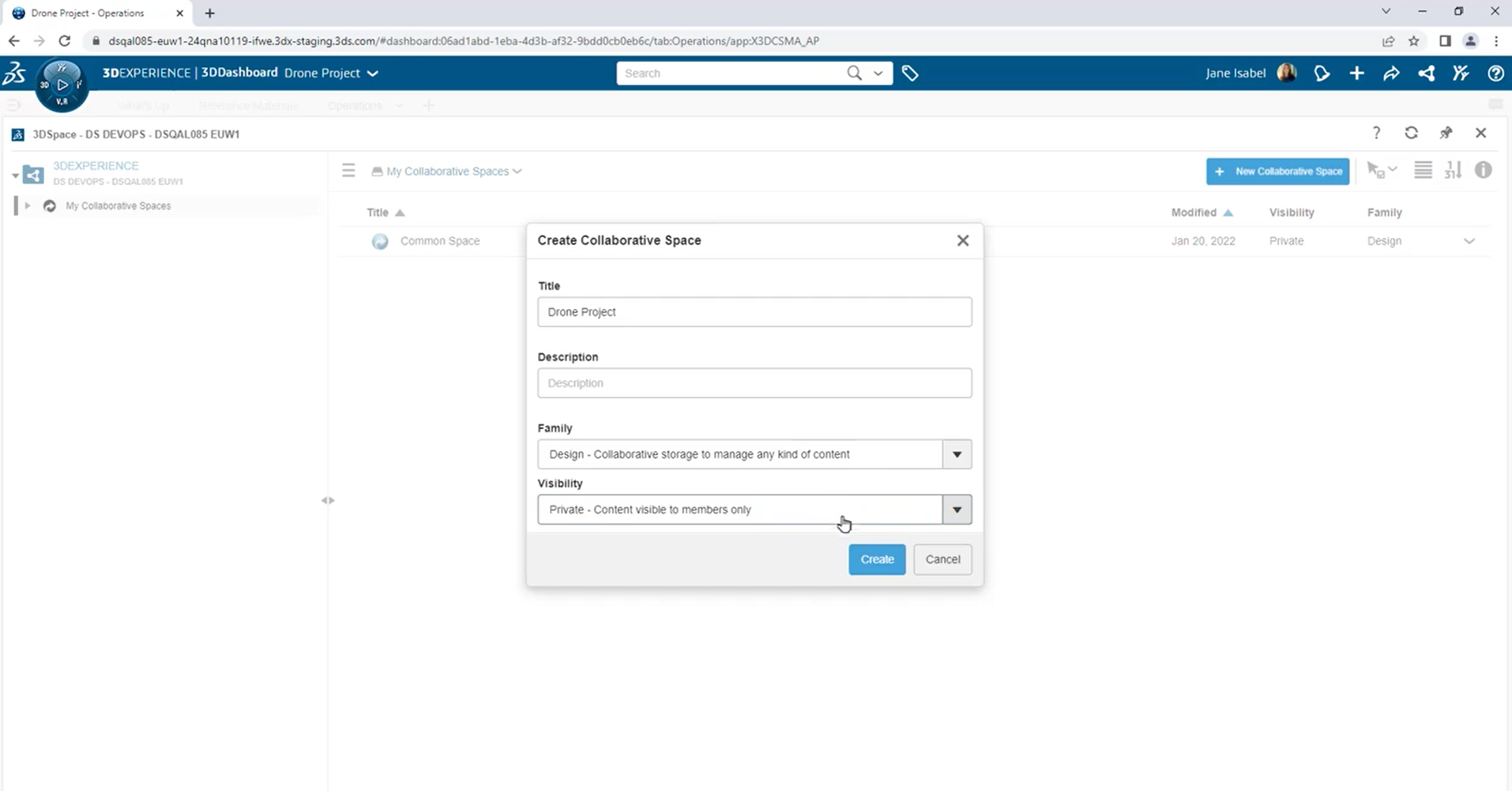
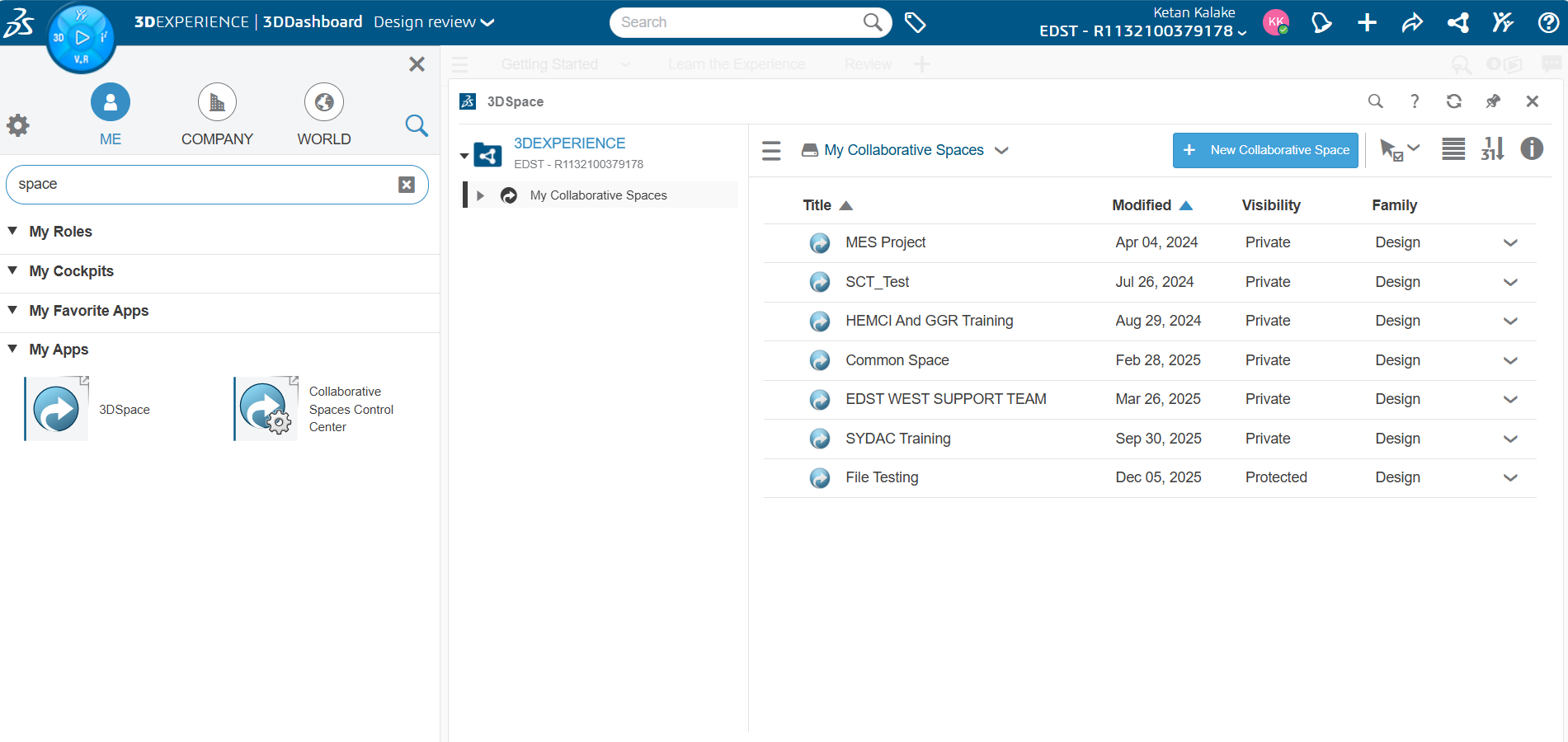
In large organizations, effective collaboration is critical. 3DEXPERIENCE provides Collaborative Spaces, enabling teams to work concurrently on designs, manage data securely, and maintain version control. Proper configuration ensures efficiency, security, and traceability, even with dozens or hundreds of users.
This article outlines best practices for setting up Collaborative Spaces for large teams.
Understand Collaborative Spaces
A Collaborative Space in 3DEXPERIENCE is a virtual workspace where users can:
- Store and manage parts, assemblies, and drawings
- Control lifecycle states and revisions
- Collaborate in real time with team members
For large teams, Collaborative Spaces are central hubs, ensuring that everyone works with up to date, validated data.
Define Roles and Permissions
Large teams need clear responsibilities. In 3DEXPERIENCE, roles control access, edit rights, and lifecycle actions.
Best practices:
- Assign Designers full access to in-progress models.
- Assign Reviewers/Managers read or approval permissions.
- Use Observers for stakeholders who need visibility without editing rights.
This prevents accidental modifications and maintains data integrity.
Organize Work by Project or Product
For large teams, structure matters. Create Collaborative Spaces based on:
- Project (e.g., “Electric Vehicle Chassis”)
- Product line (e.g., “Engine Components”)
Within each space, you can further organize by functional areas (mechanical, electrical, or design phases). A clear hierarchy reduces confusion and improves data retrieval.
Use Lifecycle and Revision Control
Lifecycle management ensures that data moves from work-in-progress to released status in a controlled manner.
Tips:
- Set In Work → Frozen → Released states for parts and assemblies.
- Implement Change Actions for post-release modifications.
- Track revisions carefully to ensure traceability and accountability.
Proper lifecycle configuration prevents errors and ensures compliance across teams.
Enable Real-Time Collaboration
For large teams, simultaneous work is key. Use 3DEXPERIENCE features like:
- Locking objects during editing to avoid conflicts
- Real-time comments and markups for design reviews
- Dashboards to monitor team activity and pending approvals
This keeps everyone aligned and reduces redundant work.
Implement Naming and Data Standards
Consistency reduces confusion in large teams. Define:
- Standardized file and part naming conventions
- Metadata rules for parts (material, size, function)
- Templates and master assemblies for recurring designs
These standards make searching, reporting, and collaboration seamless.
Monitor and Audit Spaces Regularly
For teams of 20+ designers, periodic auditing is essential:
- Review access and permissions
- Validate data integrity and lifecycle compliance
- Archive obsolete or inactive projects
This keeps Collaborative Spaces organized and ensures long-term usability.
Conclusion
Configuring Collaborative Spaces in 3DEXPERIENCE properly is essential for large teams to collaborate efficiently and safely. Clear roles, structured workspaces, lifecycle management, and standardized data practices enable teams to deliver high-quality designs faster, reduce errors, and maintain compliance.

Recent Posts
-
From Prototypes to Production: How Additive Manufacturing is Shaping Atmanirbhar Bharat
The conversation around additive manufacturing (AM) in India has evolved considerably over the past decade. What was once viewed primarily as a prototyping technology is…
-
Identify Stray Light in Imaging Systems with LightTools
Stray light is undesired light radiation that interacts with the components of a system and degrades its performance by generating noise, that significantly reduces image…
-
Redefining the Riding Experience with RAMSIS
In two‑wheeler design, comfort and safety start with the rider. RAMSIS (Realistic Anthropometric Mathematical System of Interior Comfort Simulation) is an ergonomic simulation platform that…
-

Enhancing Product Understanding through 3D Technical Illustrator
The 3D Technical Illustrator role within the 3DEXPERIENCE Platform enables organizations to transform complex engineering data into clear, interactive, and visually rich technical documentation. In…
-

Transforming Physical Parts into Digital Models with CATIA 3DEXPERIENCE Reverse Engineer role
Reverse engineering has become a critical capability in modern product development, especially when working with legacy components, competitor benchmarking, or physical prototypes that lack digital…
-
Fixing Search Service Down Issue in 3DEXPERIENCE Platform
Search is one of the most critical features in the 3DEXPERIENCE platform. If the search service goes down, users cannot find objects, documents, or data—impacting…
-
Common Installation Errors and How to Fix Them in 3DEXPERIENCE
The 3DEXPERIENCE Platform is a powerful solution used by industries worldwide for product lifecycle management (PLM), simulation, and collaboration. However, installing 3DEXPERIENCE—especially on-premise—can be complex…
-
From Classroom to Industry: Empowering Future Engineers with the 3DEXPERIENCE Platform
In today’s fast-evolving engineering and design landscape, educational institutions must go beyond conventional CAD teaching methods. While standalone tools like CATIA V5, SOLIDWORKS, or traditional…
- Ketan Kalake
- January 8, 2026
Configuring Collaborative Spaces in 3DEXPERIENCE for Large Teams
In large organizations, effective collaboration is critical. 3DEXPERIENCE provides Collaborative Spaces, enabling teams to work concurrently on designs, manage data securely, and maintain version control. Proper configuration ensures efficiency, security, and traceability, even with dozens or hundreds of users.
This article outlines best practices for setting up Collaborative Spaces for large teams.
Understand Collaborative Spaces
A Collaborative Space in 3DEXPERIENCE is a virtual workspace where users can:
- Store and manage parts, assemblies, and drawings
- Control lifecycle states and revisions
- Collaborate in real time with team members
For large teams, Collaborative Spaces are central hubs, ensuring that everyone works with up to date, validated data.
Define Roles and Permissions
Large teams need clear responsibilities. In 3DEXPERIENCE, roles control access, edit rights, and lifecycle actions.
Best practices:
- Assign Designers full access to in-progress models.
- Assign Reviewers/Managers read or approval permissions.
- Use Observers for stakeholders who need visibility without editing rights.
This prevents accidental modifications and maintains data integrity.
Organize Work by Project or Product
For large teams, structure matters. Create Collaborative Spaces based on:
- Project (e.g., “Electric Vehicle Chassis”)
- Product line (e.g., “Engine Components”)
Within each space, you can further organize by functional areas (mechanical, electrical, or design phases). A clear hierarchy reduces confusion and improves data retrieval.
Use Lifecycle and Revision Control
Lifecycle management ensures that data moves from work-in-progress to released status in a controlled manner.
Tips:
- Set In Work → Frozen → Released states for parts and assemblies.
- Implement Change Actions for post-release modifications.
- Track revisions carefully to ensure traceability and accountability.
Proper lifecycle configuration prevents errors and ensures compliance across teams.
Enable Real-Time Collaboration
For large teams, simultaneous work is key. Use 3DEXPERIENCE features like:
- Locking objects during editing to avoid conflicts
- Real-time comments and markups for design reviews
- Dashboards to monitor team activity and pending approvals
This keeps everyone aligned and reduces redundant work.
Implement Naming and Data Standards
Consistency reduces confusion in large teams. Define:
- Standardized file and part naming conventions
- Metadata rules for parts (material, size, function)
- Templates and master assemblies for recurring designs
These standards make searching, reporting, and collaboration seamless.
Monitor and Audit Spaces Regularly
For teams of 20+ designers, periodic auditing is essential:
- Review access and permissions
- Validate data integrity and lifecycle compliance
- Archive obsolete or inactive projects
This keeps Collaborative Spaces organized and ensures long-term usability.
Conclusion
Configuring Collaborative Spaces in 3DEXPERIENCE properly is essential for large teams to collaborate efficiently and safely. Clear roles, structured workspaces, lifecycle management, and standardized data practices enable teams to deliver high-quality designs faster, reduce errors, and maintain compliance.