Simplifying Complex Automotive Meshing with Surface Wrap in 3DEXPERIENCE
- Lalit Gore
- August 13, 2025
In fluid simulation, especially in automotive applications, managing complex geometries like the underbody of a car can be one of the most challenging aspects of the meshing process. Small features – such as gaps between panels, minor protrusions, or tiny edge details – can significantly increase the computational complexity, time, and even lead to solver instability.
The Surface Wrap functionality in the 3DEXPERIENCE Platform – available through the SIMULIA Fluid Model Creation app – provides a powerful solution to this problem. It enables engineers to automatically seal, smooth, and simplify complicated CAD models while maintaining the essential flow paths.
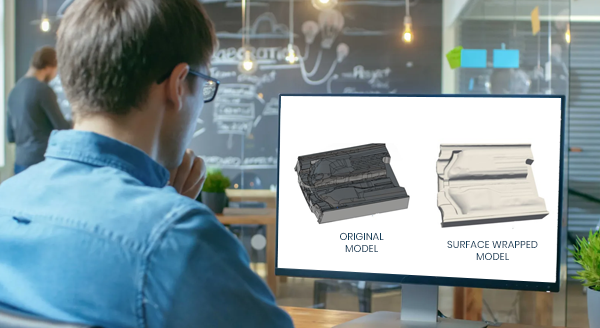
What Does the Image Show?
Left: Original car underbody with gaps and intricate features
Right: Surface-wrapped model, smoothed and meshing-ready
The image clearly demonstrates the before and after effects of surface wrapping:
- On the left, the raw geometry contains multiple gaps, crevices, and small edges – making it difficult to generate a high-quality mesh.
- On the right, after applying surface wrap, the same geometry is simplified and continuous, making it ideal for efficient Hex-Dominant Meshing.
This transformation is not just visual; it drastically improves mesh quality, reduces element count, and increases solver performance.
What Is Surface Wrap and Why Is It Important?
Surface Wrap is a preprocessing step that cleans up geometry by:
- Filling small gaps between parts (e.g., < 5 mm)
- Removing tiny, unnecessary edges and features
- Generating a smoothed, watertight external surface
- Enabling a robust and automated meshing process
This is especially useful in automotive CFD simulations, where:
- Components like bonnets, pillars, and mirrors often have narrow clearances
- Details like screws, slots, and vents don’t contribute to major flow changes
- Full-vehicle external flow simulations demand clean geometry
Without surface wrapping, engineers would need to manually simplify geometry or spend time troubleshooting mesh failures.
Real Impact: Drastic Reduction in Mesh Complexity
Using Surface Wrap, you can reduce the mesh element count by more than 60% in many cases. For example:
- A model with small 2 mm gaps can generate over 53,000 mesh elements.
- When wrapped with a 3 mm wrap size, the mesh is reduced to less than 20,000 elements.
This leads to:
- Shorter meshing time
- Faster simulation runs
- Fewer convergence issues
How It Works in 3DEXPERIENCE
When defining the Fluid Domain, the user simply:
- Enables the “Mesh with surface wrap” checkbox.
- Sets a minimum wrap size – usually larger than the smallest geometric gap to be ignored.
- Proceeds with Hex-Dominant Mesh (HDM) generation.
The software automatically:
- Detects and seals small open edges
- Smooths over redundant geometry
- Generates a clean, unified surface for meshing
Once meshed, users can visualize the wrapped surface with or without edge highlighting, ensuring confidence in the final geometry.
Why It Matters
Without Surface Wrap:
- Tiny features force finer meshes
- Increased computation time
- Risk of mesh failure or simulation error
With Surface Wrap:
- Geometry is simulation-ready
- Mesh generation is faster and cleaner
- Better control over mesh size and quality
For automotive engineers simulating aerodynamics or underbody flow, this is a game-changing step that shifts focus from cleanup to innovation.
Conclusion
The Surface Wrap tool in the 3DEXPERIENCE Platform isn’t just a convenience – it’s a necessity for handling the complex realities of modern automotive design. Even a chaotic geometry like a car’s underbody becomes clean, streamlined, and simulation-ready with just a few intelligent preprocessing steps.
This not only saves engineering time and effort, but also boosts simulation accuracy, efficiency, and reliability. For any team working on external fluid dynamics, HVAC, or thermal management – Surface Wrap is the silent hero behind a successful CFD workflow.

Recent Posts
-
3DEXPERIENCE CATIA Composite Design – Delivering Next-Generation Precision for Advanced Composite Structures
3DEXPERIENCE CATIA Composite Design is an advanced, collaborative, and highly integrated engineering solution designed to manage the complexity of modern composite structures used across aerospace,…
-

Innovating with Light: Advanced Optical Solutions for Automotive, Medical, and Photonic Systems
The rapidly evolving optical industry demands cutting-edge systems with exceptional precision and accuracy. As the market for these advanced solutions grows, engineers and manufacturers must…
-
Parametric Modeling to Improve Design Efficiency in 3DEXPERIENCE CATIA
Parametric modeling is more than applying dimensions and constraints – it is about capturing design intent so that changes can be made without rework. In 3DEXPERIENCE CATIA, well-planned parametric models reduce redesign time, improve collaboration,…
-

Configuring Collaborative Spaces in 3DEXPERIENCE for Large Teams
In large organizations, effective collaboration is critical. 3DEXPERIENCE provides Collaborative Spaces, enabling teams to work concurrently on designs, manage data securely, and maintain version control.…
-
3DEXPERIENCE Web Apps – A Complete Guide to Classic Web Applications
The 3DEXPERIENCE Web Apps – Classic User’s Guide explains the common tools, user interface, and functionalities provided by Collaboration and Approvals, which are used across…
-
3DEXPERIENCE in the Automotive Industry: Use Cases & Benefits for OEMs, Tier-1 Suppliers, and EV Manufacturers
The automotive industry is evolving at an unprecedented pace. OEMs are under pressure to reduce time to market, Tier-1 suppliers must align closely with multiple…
-

Understanding Dashboards in the 3DEXPERIENCE Platform
In today’s digital engineering environment, information is valuable only when it is clearly visible, well connected, and easy to understand. The 3DEXPERIENCE Platform addresses this…
-

3DEXPERIENCE Native Apps: A Unified, Intelligent Design Environment
The 3DEXPERIENCE Native Apps form the core working environment for designers, engineers, and collaborators who require powerful authoring, visualization, and data management capabilities directly on…
- Lalit Gore
- August 13, 2025
Simplifying Complex Automotive Meshing with Surface Wrap in 3DEXPERIENCE
In fluid simulation, especially in automotive applications, managing complex geometries like the underbody of a car can be one of the most challenging aspects of the meshing process. Small features – such as gaps between panels, minor protrusions, or tiny edge details – can significantly increase the computational complexity, time, and even lead to solver instability.
The Surface Wrap functionality in the 3DEXPERIENCE Platform – available through the SIMULIA Fluid Model Creation app – provides a powerful solution to this problem. It enables engineers to automatically seal, smooth, and simplify complicated CAD models while maintaining the essential flow paths.
What Does the Image Show?
Left: Original car underbody with gaps and intricate features
Right: Surface-wrapped model, smoothed and meshing-ready
The image clearly demonstrates the before and after effects of surface wrapping:
- On the left, the raw geometry contains multiple gaps, crevices, and small edges – making it difficult to generate a high-quality mesh.
- On the right, after applying surface wrap, the same geometry is simplified and continuous, making it ideal for efficient Hex-Dominant Meshing.
This transformation is not just visual; it drastically improves mesh quality, reduces element count, and increases solver performance.
What Is Surface Wrap and Why Is It Important?
Surface Wrap is a preprocessing step that cleans up geometry by:
- Filling small gaps between parts (e.g., < 5 mm)
- Removing tiny, unnecessary edges and features
- Generating a smoothed, watertight external surface
- Enabling a robust and automated meshing process
This is especially useful in automotive CFD simulations, where:
- Components like bonnets, pillars, and mirrors often have narrow clearances
- Details like screws, slots, and vents don’t contribute to major flow changes
- Full-vehicle external flow simulations demand clean geometry
Without surface wrapping, engineers would need to manually simplify geometry or spend time troubleshooting mesh failures.
Real Impact: Drastic Reduction in Mesh Complexity
Using Surface Wrap, you can reduce the mesh element count by more than 60% in many cases. For example:
- A model with small 2 mm gaps can generate over 53,000 mesh elements.
- When wrapped with a 3 mm wrap size, the mesh is reduced to less than 20,000 elements.
This leads to:
- Shorter meshing time
- Faster simulation runs
- Fewer convergence issues
How It Works in 3DEXPERIENCE
When defining the Fluid Domain, the user simply:
- Enables the “Mesh with surface wrap” checkbox.
- Sets a minimum wrap size – usually larger than the smallest geometric gap to be ignored.
- Proceeds with Hex-Dominant Mesh (HDM) generation.
The software automatically:
- Detects and seals small open edges
- Smooths over redundant geometry
- Generates a clean, unified surface for meshing
Once meshed, users can visualize the wrapped surface with or without edge highlighting, ensuring confidence in the final geometry.
Why It Matters
Without Surface Wrap:
- Tiny features force finer meshes
- Increased computation time
- Risk of mesh failure or simulation error
With Surface Wrap:
- Geometry is simulation-ready
- Mesh generation is faster and cleaner
- Better control over mesh size and quality
For automotive engineers simulating aerodynamics or underbody flow, this is a game-changing step that shifts focus from cleanup to innovation.
Conclusion
The Surface Wrap tool in the 3DEXPERIENCE Platform isn’t just a convenience – it’s a necessity for handling the complex realities of modern automotive design. Even a chaotic geometry like a car’s underbody becomes clean, streamlined, and simulation-ready with just a few intelligent preprocessing steps.
This not only saves engineering time and effort, but also boosts simulation accuracy, efficiency, and reliability. For any team working on external fluid dynamics, HVAC, or thermal management – Surface Wrap is the silent hero behind a successful CFD workflow.