ENOVIA Scalability on Windows: A Deep Dive into Performance Engineering

- Lalit Gore
- August 19, 2025
Product Lifecycle Management (PLM) is the backbone of modern manufacturing and design organizations. As projects become more complex, involving thousands of engineers, massive assemblies, and cross-department collaboration, the underlying PLM system must scale efficiently.
Dassault Systèmes’ ENOVIA PCS (Performance & Scalability) for Windows provides a structured approach to understanding how ENOVIA can handle enterprise-level scalability challenges. Let’s dive into the core insights.
Why Scalability in ENOVIA Matters
A non-scalable PLM system creates bottlenecks:
- Users face slow responses while loading or saving large assemblies.
- Databases crash due to connection overloads.
- Servers fail under the weight of simultaneous operations.
To counter these, Dassault Systèmes emphasizes Performance & Scalability (PCS) testing. This testing ensures that ENOVIA infrastructure can handle workloads from hundreds — even thousands — of concurrent users.
🖥 ENOVIA Architecture – The Backbone

At its heart, ENOVIA follows a multi-tiered architecture:
- Vault Server – Securely manages storage and retrieval of files.
- Handles file descriptors and client requests.
- Requires optimized thread pools for high concurrency.
- Application Server – Acts as the engine of ENOVIA.
- Hosts PCS services and manages user sessions.
- Relies on Orbix configuration for efficient communication.
- Database Server – The foundation for structured data.
- For DB2: Supports up to 2000+ concurrent connections with optimized parameters.
- For Oracle: Requires fine-tuned Processes and Sessions for stability.
- Clients (CATIA/ENOVIA Users) – Engineers and designers interacting with the system.
- Their interactions (logins, queries, design saves) generate the real-world load for PCS testing.
Prerequisites for High Performance
To make PCS testing meaningful, system configurations must be optimized:
- Vault Server Tuning:
- Set environment variables like IT_FD_STOP_LISTENING_POINT and IT_DAEMON_CONNECTION_LIMIT.
- Configure VaultServer.properties for thread pool and DB connection pool management.
- Application Server Tuning:
- Increase Orbix connection timeouts (IT_DEFAULT_TIMEOUT, IT_CONNECTION_TIMEOUT).
- Maintain consistent VaultClient.properties across both client and server.
- Database Optimization:
- DB2 → Parameters like MAXAPPLS, MAXAGENTS, MAX_COORDAGENTS set to 2000.
- Oracle → PROCESSES and SESSIONS scaled to 1900+ concurrent connections.
- Licensing: Increase concurrent DSLS/LUM licenses since each PCS test keeps user sessions active.
PCS Test Scenarios
Dassault Systèmes defines four real-world scenarios to test scalability:
- Login → Query → Load
- Simulates users logging in, querying for documents, and loading them into CATIA.
- Visualization Mode → Design Mode
- Switches large assemblies from lightweight visualization mode to full design mode.
- Stresses cache management and design data conversion.
- Login → Query → Load (Publication Exposed Assembly)
- Handles publication-exposed Product Representations (PRC).
- Tests how efficiently assemblies are queried and loaded under multi-user conditions.
- Save to ENOVIA
- Saves large assemblies from local disk into ENOVIA as Structure Exposed assemblies.
- Requires Server UserExit (UE) for batch execution.
- Highlights how save operations impact both vault and database under load.
Troubleshooting Common PCS Errors
- During testing, typical errors may occur:
- Connection Error → Check CATSettings, Java path, or licensing.
- Load Document Error → Verify database references & VaultClient configuration.
- Session Creation Failed → Usually due to insufficient licenses.
- Trace Logs are vital for root cause analysis:
- Client Traces → VaultClient ENOVIALCATraces –k
- Server Traces → ServerPlugin PsPlugin PluginHandler logs
- Vault Traces → Enable VaultServer_Trace = ON to capture ENOVIAVaultServer.log
- Orbix Traces → Run with -u –t –a flags for connection management insights
Real Test Results
From Dassault’s official PCS test environment:
- Hardware Setup:
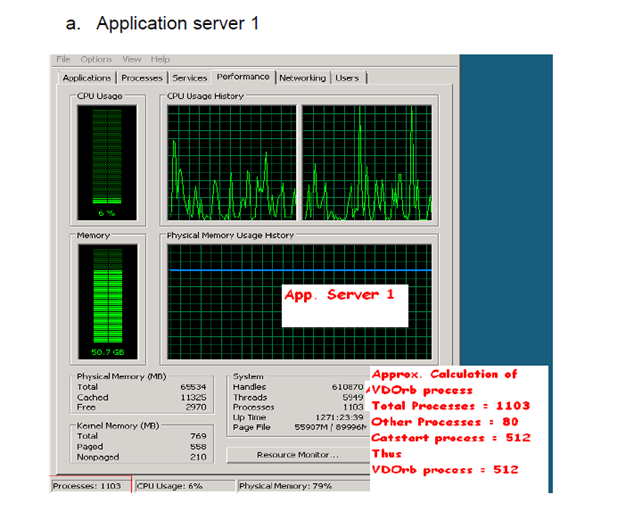
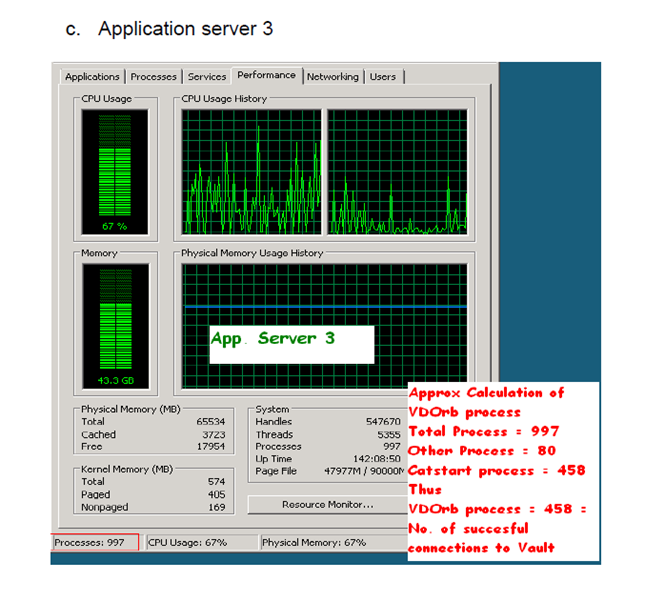
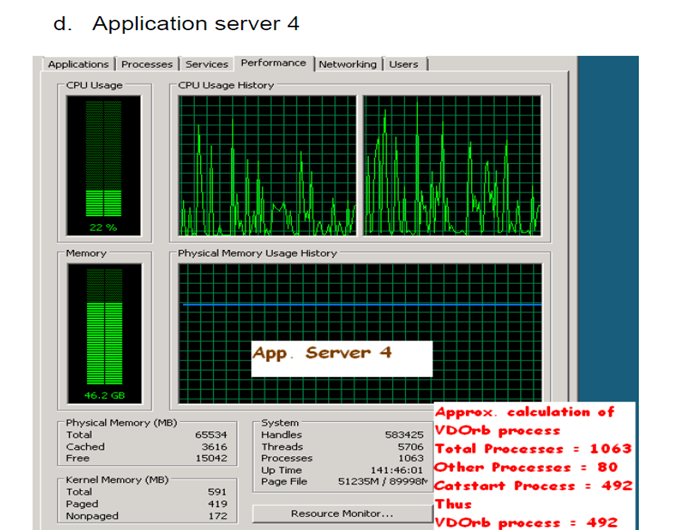
- 4 Application Servers (Windows 2008, 64 GB RAM each)
- 1 Vault Server (Windows 2008, 4 GB RAM)
- 19 Clients (Windows 7/XP, mix of 4 GB & 16 GB RAM)
- Outcome:
- Achieved 1970 persistent client connections.
- Each application server managed ~500 stable connections.
- Load distribution:
- 82 connections per 16 clients (4 GB)
- 650 connections per 3 clients (16 GB)
- Monitoring:
- Task Manager showed stable memory usage across application servers.
- No major crashes under peak load conditions.

Key Takeaways
- PCS testing is essential for ensuring that ENOVIA environments can scale to thousands of users.
- Proper tuning of Vault, Application, and Database servers makes a direct impact on scalability.
- Batch simulation of real-world scenarios (login, query, load, save) provides confidence in production stability.
- With optimized hardware and configurations, ENOVIA achieved nearly 2000 persistent user connections.

Recent Posts
-
3DEXPERIENCE CATIA Composite Design – Delivering Next-Generation Precision for Advanced Composite Structures
3DEXPERIENCE CATIA Composite Design is an advanced, collaborative, and highly integrated engineering solution designed to manage the complexity of modern composite structures used across aerospace,…
-

Innovating with Light: Advanced Optical Solutions for Automotive, Medical, and Photonic Systems
The rapidly evolving optical industry demands cutting-edge systems with exceptional precision and accuracy. As the market for these advanced solutions grows, engineers and manufacturers must…
-
Parametric Modeling to Improve Design Efficiency in 3DEXPERIENCE CATIA
Parametric modeling is more than applying dimensions and constraints – it is about capturing design intent so that changes can be made without rework. In 3DEXPERIENCE CATIA, well-planned parametric models reduce redesign time, improve collaboration,…
-

Configuring Collaborative Spaces in 3DEXPERIENCE for Large Teams
In large organizations, effective collaboration is critical. 3DEXPERIENCE provides Collaborative Spaces, enabling teams to work concurrently on designs, manage data securely, and maintain version control.…
-
3DEXPERIENCE Web Apps – A Complete Guide to Classic Web Applications
The 3DEXPERIENCE Web Apps – Classic User’s Guide explains the common tools, user interface, and functionalities provided by Collaboration and Approvals, which are used across…
-

3DEXPERIENCE in the Automotive Industry: Use Cases & Benefits for OEMs, Tier-1 Suppliers, and EV Manufacturers
The automotive industry is evolving at an unprecedented pace. OEMs are under pressure to reduce time to market, Tier-1 suppliers must align closely with multiple…
-
Understanding Dashboards in the 3DEXPERIENCE Platform
In today’s digital engineering environment, information is valuable only when it is clearly visible, well connected, and easy to understand. The 3DEXPERIENCE Platform addresses this…
-

3DEXPERIENCE Native Apps: A Unified, Intelligent Design Environment
The 3DEXPERIENCE Native Apps form the core working environment for designers, engineers, and collaborators who require powerful authoring, visualization, and data management capabilities directly on…
- Lalit Gore
- August 19, 2025
ENOVIA Scalability on Windows: A Deep Dive into Performance Engineering
Product Lifecycle Management (PLM) is the backbone of modern manufacturing and design organizations. As projects become more complex, involving thousands of engineers, massive assemblies, and cross-department collaboration, the underlying PLM system must scale efficiently.
Dassault Systèmes’ ENOVIA PCS (Performance & Scalability) for Windows provides a structured approach to understanding how ENOVIA can handle enterprise-level scalability challenges. Let’s dive into the core insights.
Why Scalability in ENOVIA Matters
A non-scalable PLM system creates bottlenecks:
- Users face slow responses while loading or saving large assemblies.
- Databases crash due to connection overloads.
- Servers fail under the weight of simultaneous operations.
To counter these, Dassault Systèmes emphasizes Performance & Scalability (PCS) testing. This testing ensures that ENOVIA infrastructure can handle workloads from hundreds — even thousands — of concurrent users.
🖥 ENOVIA Architecture – The Backbone
At its heart, ENOVIA follows a multi-tiered architecture:
- Vault Server – Securely manages storage and retrieval of files.
- Handles file descriptors and client requests.
- Requires optimized thread pools for high concurrency.
- Application Server – Acts as the engine of ENOVIA.
- Hosts PCS services and manages user sessions.
- Relies on Orbix configuration for efficient communication.
- Database Server – The foundation for structured data.
- For DB2: Supports up to 2000+ concurrent connections with optimized parameters.
- For Oracle: Requires fine-tuned Processes and Sessions for stability.
- Clients (CATIA/ENOVIA Users) – Engineers and designers interacting with the system.
- Their interactions (logins, queries, design saves) generate the real-world load for PCS testing.
Prerequisites for High Performance
To make PCS testing meaningful, system configurations must be optimized:
- Vault Server Tuning:
- Set environment variables like IT_FD_STOP_LISTENING_POINT and IT_DAEMON_CONNECTION_LIMIT.
- Configure VaultServer.properties for thread pool and DB connection pool management.
- Application Server Tuning:
- Increase Orbix connection timeouts (IT_DEFAULT_TIMEOUT, IT_CONNECTION_TIMEOUT).
- Maintain consistent VaultClient.properties across both client and server.
- Database Optimization:
- DB2 → Parameters like MAXAPPLS, MAXAGENTS, MAX_COORDAGENTS set to 2000.
- Oracle → PROCESSES and SESSIONS scaled to 1900+ concurrent connections.
- Licensing: Increase concurrent DSLS/LUM licenses since each PCS test keeps user sessions active.
PCS Test Scenarios
Dassault Systèmes defines four real-world scenarios to test scalability:
- Login → Query → Load
- Simulates users logging in, querying for documents, and loading them into CATIA.
- Visualization Mode → Design Mode
- Switches large assemblies from lightweight visualization mode to full design mode.
- Stresses cache management and design data conversion.
- Login → Query → Load (Publication Exposed Assembly)
- Handles publication-exposed Product Representations (PRC).
- Tests how efficiently assemblies are queried and loaded under multi-user conditions.
- Save to ENOVIA
- Saves large assemblies from local disk into ENOVIA as Structure Exposed assemblies.
- Requires Server UserExit (UE) for batch execution.
- Highlights how save operations impact both vault and database under load.
Troubleshooting Common PCS Errors
- During testing, typical errors may occur:
- Connection Error → Check CATSettings, Java path, or licensing.
- Load Document Error → Verify database references & VaultClient configuration.
- Session Creation Failed → Usually due to insufficient licenses.
- Trace Logs are vital for root cause analysis:
- Client Traces → VaultClient ENOVIALCATraces –k
- Server Traces → ServerPlugin PsPlugin PluginHandler logs
- Vault Traces → Enable VaultServer_Trace = ON to capture ENOVIAVaultServer.log
- Orbix Traces → Run with -u –t –a flags for connection management insights
Real Test Results
From Dassault’s official PCS test environment:
- Hardware Setup:
- 4 Application Servers (Windows 2008, 64 GB RAM each)
- 1 Vault Server (Windows 2008, 4 GB RAM)
- 19 Clients (Windows 7/XP, mix of 4 GB & 16 GB RAM)
- Outcome:
- Achieved 1970 persistent client connections.
- Each application server managed ~500 stable connections.
- Load distribution:
- 82 connections per 16 clients (4 GB)
- 650 connections per 3 clients (16 GB)
- Monitoring:
- Task Manager showed stable memory usage across application servers.
- No major crashes under peak load conditions.
Key Takeaways
- PCS testing is essential for ensuring that ENOVIA environments can scale to thousands of users.
- Proper tuning of Vault, Application, and Database servers makes a direct impact on scalability.
- Batch simulation of real-world scenarios (login, query, load, save) provides confidence in production stability.
- With optimized hardware and configurations, ENOVIA achieved nearly 2000 persistent user connections.