Reduce Errors and Repetitive Tasks with Assembly Symmetry & Pattern in 3DEXPERIENCE R2024x
- Lalit Gore
- August 19, 2025
In modern product development, design efficiency is not just about speed – it’s about precision, automation, and reusability. Dassault Systèmes 3DEXPERIENCE R2024x introduces advanced capabilities in Assembly Symmetry and Assembly Pattern that empower engineers to streamline repetitive design tasks, maintain associativity, and reduce errors.
These two functions – though often used together – serve distinct purposes in mechanical design. Let’s dive into how they work and why they matter.
Assembly Symmetry: Mirroring Made Smarter
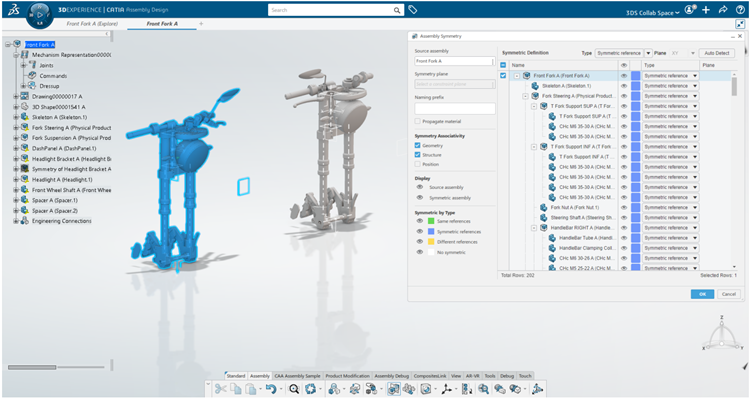
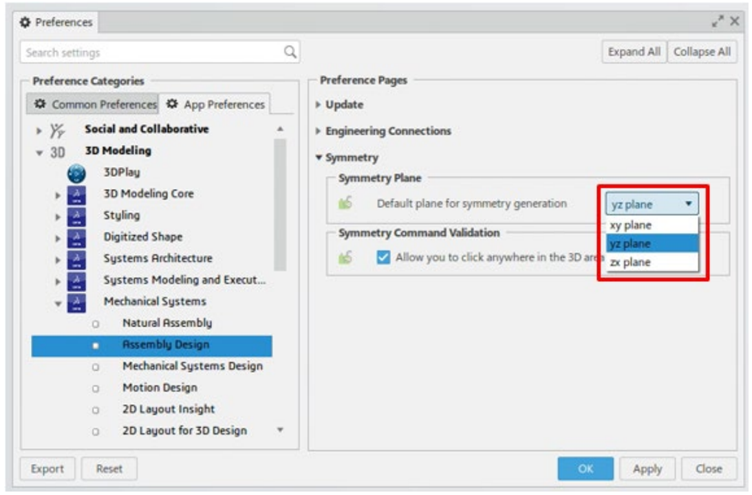
The Assembly Symmetry command allows designers to quickly generate symmetric product structures from an existing assembly. Instead of recreating mirrored components manually, the system leverages defined symmetry planes (by default YZ, but configurable to ZX or XY).
Key features include:
- Symmetry of Root Products vs. Sub-Products – Designers can apply symmetry to the entire assembly (root) or selectively to sub-products.
- Specification Types – Users can choose between Symmetric References, Same Reference, Different Reference, or No Symmetry depending on design needs.
- Associativity Control – Geometry, structure, and position associativity ensure mirrored products remain linked to the original, automatically updating when changes occur.
- Material & Naming Inheritance – Symmetric assemblies can inherit material properties and use customized prefixes for clarity.
Use Case Example: In automotive design, when creating left and right doors, Assembly Symmetry ensures that geometric modifications to one door propagate seamlessly to the other, saving time and reducing manual rework.
Assembly Pattern: Multiplying with Intelligence
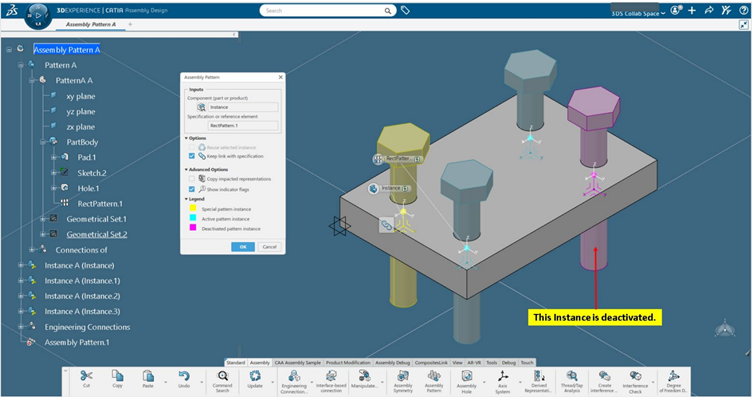
The Assembly Pattern command is designed for creating repeated instances of components within an assembly – such as bolts, rivets, or repetitive features like holes.
Supported pattern types include:
- Rectangular Assembly Pattern
- Circular Assembly Pattern
- User-Defined Assembly Pattern
- Axis System-Based Pattern
- Patterns derived from Part Design or Generative Shape Design
- Highlights of Assembly Pattern:
- Associativity Options – Patterned instances remain linked to the original, so any change updates all instances.
- Constraint Management – Engineering connections can be reused or newly assigned across instances.
- Advanced Impact Options – Users can choose whether only clashing impacts (intersections) or all impacts are copied.
- Visualization Tools – Color-coded legends (yellow for reference, cyan for active instances, magenta for deactivated ones) enhance clarity.
Use Case Example: In aerospace design, when placing multiple fasteners along a fuselage panel, Assembly Pattern ensures all instances follow a consistent axis system and update automatically if the base geometry changes.
Why These Functions Matter
- Minimize repetitive manual work
- Enhance collaboration through consistent updates
- Reduce error risks in complex assemblies
- Speed up design cycles in automotive, aerospace, and manufacturing industries
- Help engineers focus on innovation rather than repetitive modeling
Conclusion
With Assembly Symmetry and Assembly Pattern, the 3DEXPERIENCE platform equips designers with automation tools that bridge creativity and efficiency. Whether mirroring large assemblies or multiplying components with precision, these features ensure that product development remains agile, reliable, and future-ready.

Recent Posts
-

From Prototypes to Production: How Additive Manufacturing is Shaping Atmanirbhar Bharat
The conversation around additive manufacturing (AM) in India has evolved considerably over the past decade. What was once viewed primarily as a prototyping technology is…
-
Identify Stray Light in Imaging Systems with LightTools
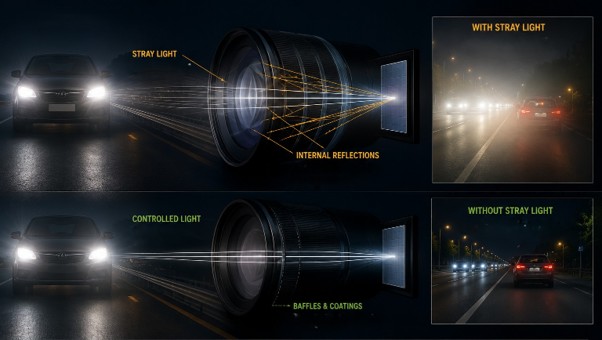
Stray light is undesired light radiation that interacts with the components of a system and degrades its performance by generating noise, that significantly reduces image…
-
Redefining the Riding Experience with RAMSIS
In two‑wheeler design, comfort and safety start with the rider. RAMSIS (Realistic Anthropometric Mathematical System of Interior Comfort Simulation) is an ergonomic simulation platform that…
-
Enhancing Product Understanding through 3D Technical Illustrator
The 3D Technical Illustrator role within the 3DEXPERIENCE Platform enables organizations to transform complex engineering data into clear, interactive, and visually rich technical documentation. In…
-

Transforming Physical Parts into Digital Models with CATIA 3DEXPERIENCE Reverse Engineer role
Reverse engineering has become a critical capability in modern product development, especially when working with legacy components, competitor benchmarking, or physical prototypes that lack digital…
-
Fixing Search Service Down Issue in 3DEXPERIENCE Platform
Search is one of the most critical features in the 3DEXPERIENCE platform. If the search service goes down, users cannot find objects, documents, or data—impacting…
-
Common Installation Errors and How to Fix Them in 3DEXPERIENCE
The 3DEXPERIENCE Platform is a powerful solution used by industries worldwide for product lifecycle management (PLM), simulation, and collaboration. However, installing 3DEXPERIENCE—especially on-premise—can be complex…
-
From Classroom to Industry: Empowering Future Engineers with the 3DEXPERIENCE Platform
In today’s fast-evolving engineering and design landscape, educational institutions must go beyond conventional CAD teaching methods. While standalone tools like CATIA V5, SOLIDWORKS, or traditional…
- Lalit Gore
- August 19, 2025
Reduce Errors and Repetitive Tasks with Assembly Symmetry & Pattern in 3DEXPERIENCE R2024x
In modern product development, design efficiency is not just about speed – it’s about precision, automation, and reusability. Dassault Systèmes 3DEXPERIENCE R2024x introduces advanced capabilities in Assembly Symmetry and Assembly Pattern that empower engineers to streamline repetitive design tasks, maintain associativity, and reduce errors.
These two functions – though often used together – serve distinct purposes in mechanical design. Let’s dive into how they work and why they matter.
Assembly Symmetry: Mirroring Made Smarter
The Assembly Symmetry command allows designers to quickly generate symmetric product structures from an existing assembly. Instead of recreating mirrored components manually, the system leverages defined symmetry planes (by default YZ, but configurable to ZX or XY).
Key features include:
- Symmetry of Root Products vs. Sub-Products – Designers can apply symmetry to the entire assembly (root) or selectively to sub-products.
- Specification Types – Users can choose between Symmetric References, Same Reference, Different Reference, or No Symmetry depending on design needs.
- Associativity Control – Geometry, structure, and position associativity ensure mirrored products remain linked to the original, automatically updating when changes occur.
- Material & Naming Inheritance – Symmetric assemblies can inherit material properties and use customized prefixes for clarity.
Use Case Example: In automotive design, when creating left and right doors, Assembly Symmetry ensures that geometric modifications to one door propagate seamlessly to the other, saving time and reducing manual rework.
Assembly Pattern: Multiplying with Intelligence
The Assembly Pattern command is designed for creating repeated instances of components within an assembly – such as bolts, rivets, or repetitive features like holes.
Supported pattern types include:
- Rectangular Assembly Pattern
- Circular Assembly Pattern
- User-Defined Assembly Pattern
- Axis System-Based Pattern
- Patterns derived from Part Design or Generative Shape Design
- Highlights of Assembly Pattern:
- Associativity Options – Patterned instances remain linked to the original, so any change updates all instances.
- Constraint Management – Engineering connections can be reused or newly assigned across instances.
- Advanced Impact Options – Users can choose whether only clashing impacts (intersections) or all impacts are copied.
- Visualization Tools – Color-coded legends (yellow for reference, cyan for active instances, magenta for deactivated ones) enhance clarity.
Use Case Example: In aerospace design, when placing multiple fasteners along a fuselage panel, Assembly Pattern ensures all instances follow a consistent axis system and update automatically if the base geometry changes.
Why These Functions Matter
- Minimize repetitive manual work
- Enhance collaboration through consistent updates
- Reduce error risks in complex assemblies
- Speed up design cycles in automotive, aerospace, and manufacturing industries
- Help engineers focus on innovation rather than repetitive modeling
Conclusion
With Assembly Symmetry and Assembly Pattern, the 3DEXPERIENCE platform equips designers with automation tools that bridge creativity and efficiency. Whether mirroring large assemblies or multiplying components with precision, these features ensure that product development remains agile, reliable, and future-ready.