Driving Sustainable Innovation with 3DEXPERIENCE Virtual Twin

In today’s rapidly evolving and environmentally conscious world, industries are under increasing pressure to innovate sustainably. The challenge is not just to create better products but to do so in a way that conserves resource, minimizes waste, and reduces environmental impact. Enter the 3DEXPERIENCE platform by Dassault Systèmes, which offers a groundbreaking approach to sustainable innovation through the power of virtual twin.


What is a Virtual Twin?

Virtual twin is a digital replica of physical assets, processes, or systems. Unlike static digital models, virtual twin evolves in real time, continuously reflecting the current state of their physical counterparts. On the 3DEXPERIENCE platform, this provides a unified, data-rich environment where stakeholders can simulate, analyse, and optimize every aspect of a product or process before it is built or modified.
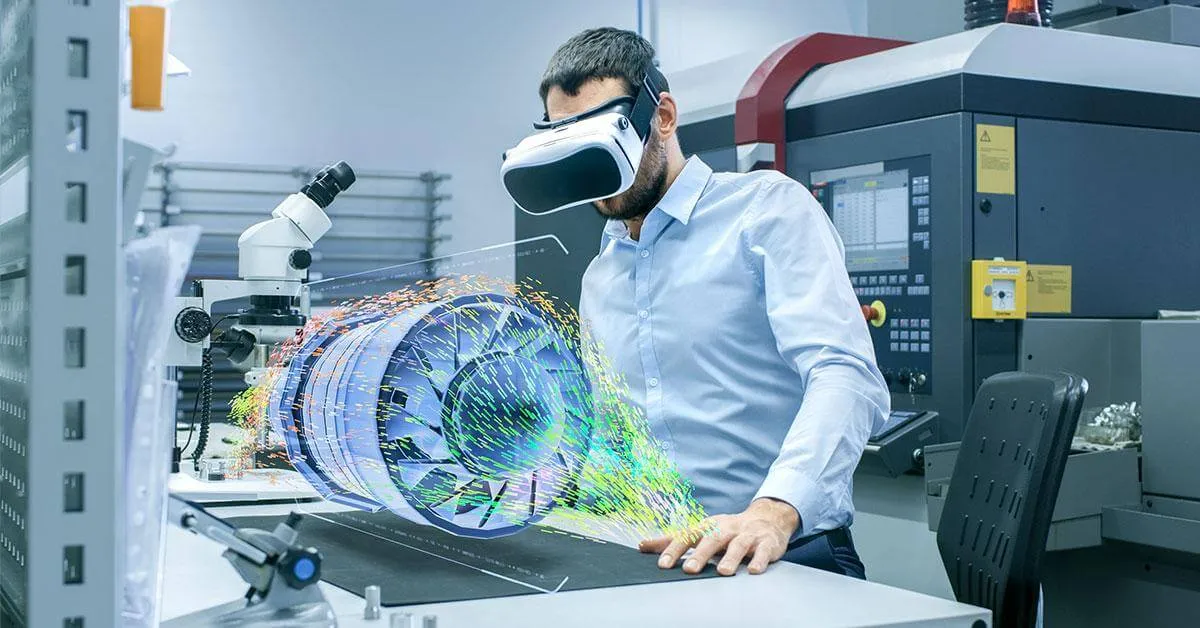
Embracing Dassault Systèmes Virtual Twin Technology allows users to unlock sustainable business innovation benefits by visualizing, modelling, and simulating entire environments without resorting to costly trial-and-error programs.

Through the power of the virtual twin, a train manufacturer was able to reduce the carbon footprint by 40% by designing a train that was more efficient.

In addition, life cycle assessment (LCA) can help quantify the environmental impact of products, thereby being useful for transitioning to the generative economy resulting from the convergence of the experience economy and the circular economy.


Enabling Informed Decision-Making 

Sustainable innovation begins with informed choices. Virtual twin allows engineers, designers, and decision-makers to evaluate the environmental impact of design alternatives long before physical production begins.  By simulating energy consumption, material usage, and emissions, teams can compare scenarios and select the most eco-friendly options without compromising performance or quality.
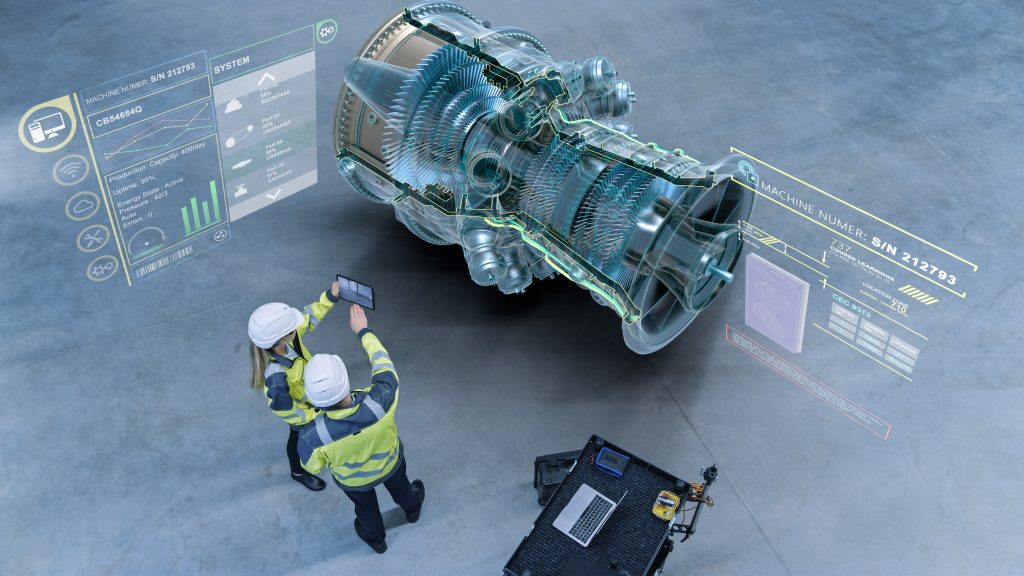

Optimizing Resource Efficiency – Lower Carbon Footprint 

One of the most direct benefits of virtual twin is their ability to optimize the use of materials and energy. The 3DEXPERIENCE platform helps teams:

  • Identify material substitutes with lower carbon footprints
  • Reduce overengineering and excess material waste
  • Optimize manufacturing processes to cut down energy consumption

This optimization leads to leaner, greener production workflows that are both cost-effective and environmentally responsible.


Accelerating Eco-Innovation Cycles 

Virtual twin shortens the innovation cycle by enabling rapid prototyping in a virtual space.  Instead of building multiple physical prototypes, companies can simulate, test, and validate new designs virtually. This not only saves time and cost but also significantly reduces the carbon footprint associated with traditional prototyping.


Supporting Circular Economy Models 

Sustainability doesn’t end with the product launch. The 3DEXPERIENCE platform supports circular economy principles by enabling lifecycle analysis and end-of-life planning. Virtual twin helps organizations plan for reuse, recycling, and remanufacturing, ensuring that products are designed with their full lifecycle in mind.


 Real-World Applications 

From smart cities and infrastructure to aerospace and life sciences, virtual twin is already making a difference. For example:

  • In construction, it helps optimize energy use in buildings
  • In healthcare, it models patient-specific treatments to minimize trial-and-error waste
  • In transportation, it simulates vehicle performance to meet emissions targets


Conclusion 

Sustainable innovation is not a distant goal; it is a necessity. The 3DEXPERIENCE platform, with its robust virtual twin capabilities, empowers organizations to innovate smarter, faster, and greener. By integrating sustainability into the very fabric of design and production, Dassault Systèmes is helping businesses turn their environmental commitments into actionable results.
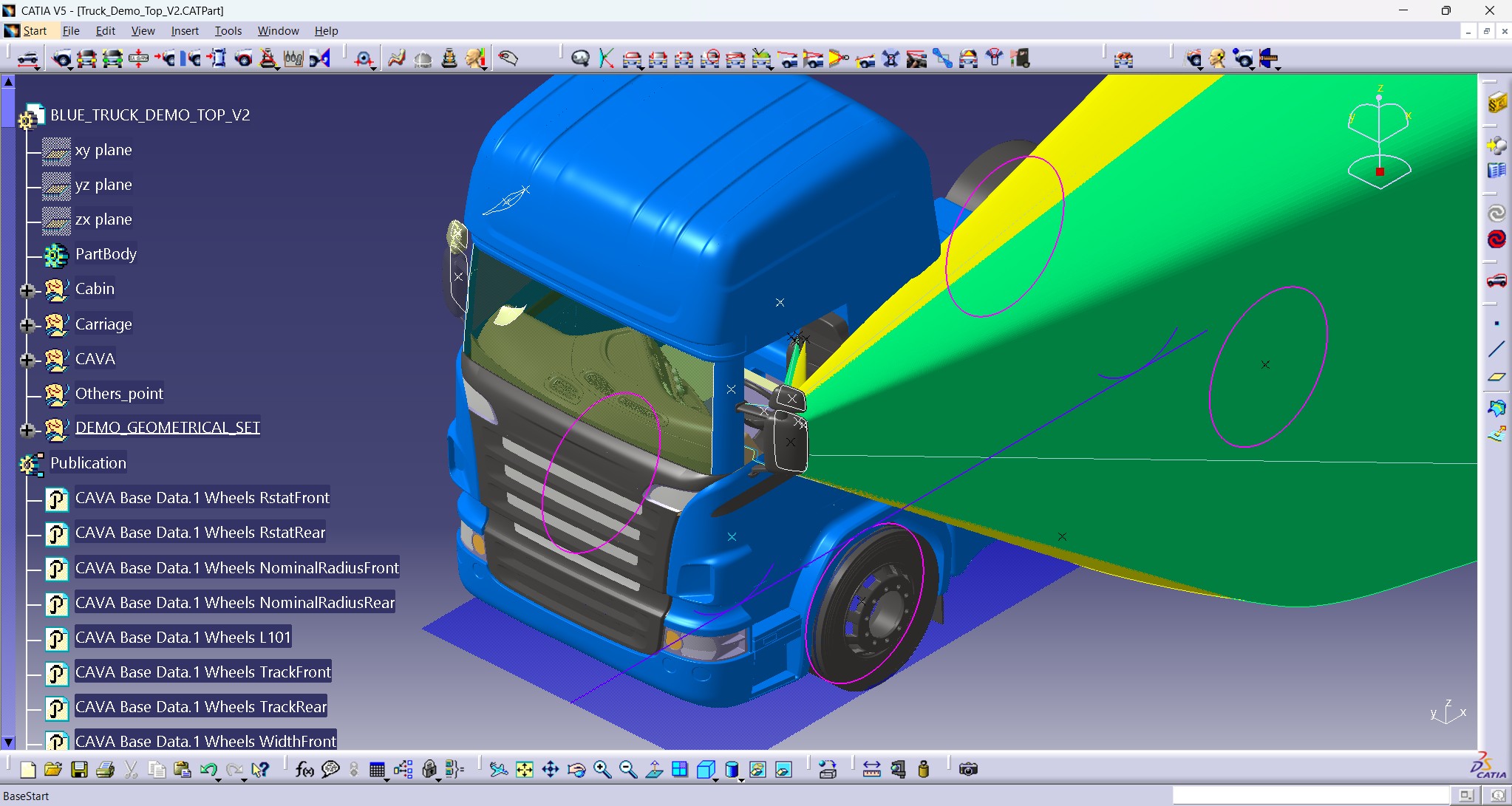
Virtual Homologation of Truck Mirrors using CAVA

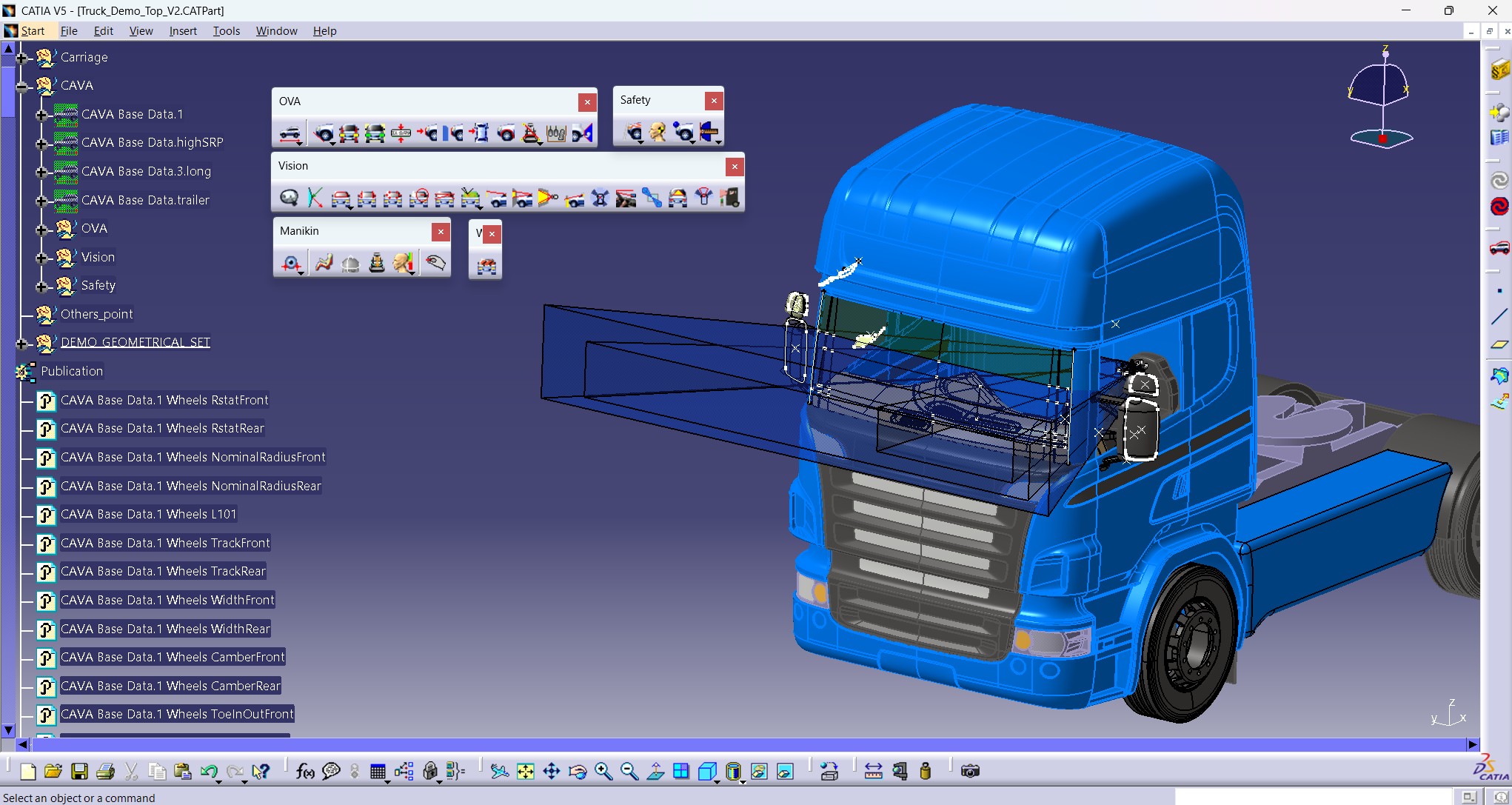
Virtual homologation is revolutionizing automotive mirror approval processes, especially for trucks subject to strict visibility and safety regulations. AIS 002 Rev. 1, the Indian Automotive Standard governing devices for indirect vision, defines comprehensive requirements for truck mirrors to ensure drivers have optimal visibility of critical blind spots around their vehicles. Traditional homologation of mirrors often involves extensive physical prototyping and testing. However, with Technia’s CAVA software – integrated seamlessly within CATIA V5 and the 3DEXPERIENCE platform – OEMs can now perform virtual homologation without installing additional applications. This integration allows mirror compliance checks directly within the vehicle’s CAD environment, accelerating development cycles and ensuring regulatory adherence from early design stages.


Understanding AIS 002 Rev. 1 for Trucks

AIS 002 Rev. 1 applies to rear-view mirrors and devices for indirect vision on trucks (N category vehicles), focusing on installation, positioning, and field of vision coverage critical to driver safety. Trucks must be equipped with main exterior mirrors on both driver and passenger sides, with additional wide-angle, close-proximity, and front mirrors mandated based on vehicle size (N2 and N3 categories). The regulation specifies minimum visibility zones that mirrors must cover, such as a 5-meter-wide rear road section extending from 10 to 30 meters behind the driver’s eye point (ocular points) set 65 mm apart horizontally and 635 mm above the R point (seating reference point). Mirrors must be mounted at stable positions, typically at least 2 meters above ground for close-proximity and front mirrors and must remain vibration-free under driving conditions to ensure uninterrupted visibility.

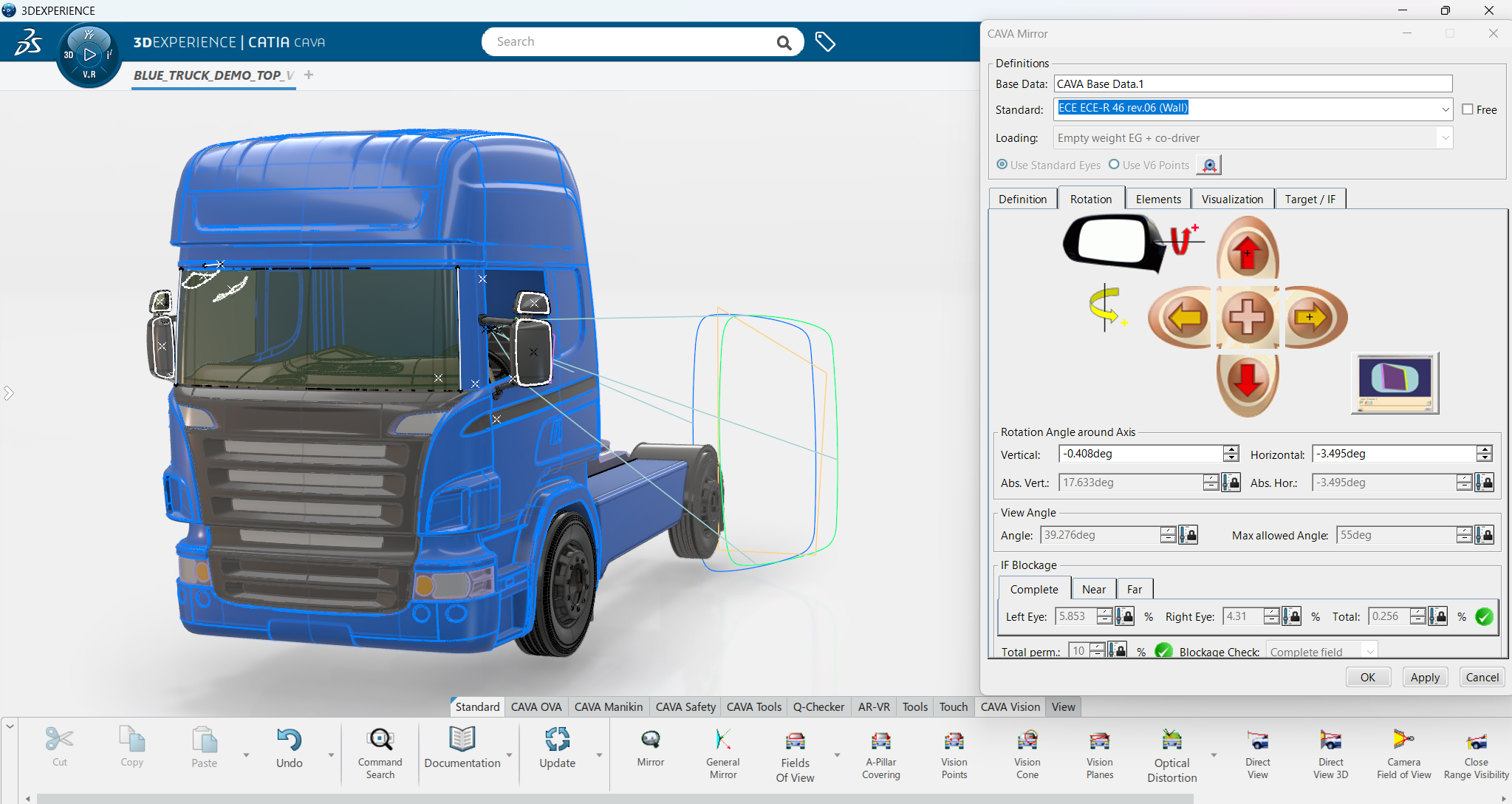
AIS 002 Rev. 1 (Wall) is a focused extension emphasizing “wall zones” – geometric visibility planes immediately adjacent to vehicle sides and front. It formalizes the measurement of blind spot coverage using reflective light and field-of-vision diagrams, pinpointing spatial zones critical for eliminating close-range blind spots. This part of the standard is especially crucial for large trucks to meet stringent safety regulations.


Mirror Classes Covered Under AIS 002 for Trucks Which Can Be Analyzed in CAVA as Well

AIS 002 Rev. 1 categorizes mirrors into specific classes based on their field of vision and application to ensure comprehensive coverage around trucks and related vehicles:

  • Class II – Main Rear-View Device:
    Covers a larger section behind and beside the vehicle. This is the primary exterior mirror used on all trucks for general rear visibility.
  • Class III – Main Rear-View Device (Alternative Orientation):
    Often grouped with Class II, this class includes mirrors positioned or oriented differently but serving the main rear-view function, particularly on trucks.
  • Class IV – Wide-Angle Exterior Mirror:
    Provides a wider lateral field of vision alongside the vehicle, reducing blind spots on the sides. These are especially important for large trucks to cover adjacent lanes.
  • Class V – Close-Proximity View Mirror:
    Focuses on the area immediately beside the cab or vehicle body. These mirrors help drivers detect objects or pedestrians very close to the vehicle, enhancing safety in tight manoeuvres.
  • Class VI – Front View Device:
    Covers the blind spot area directly in front of the truck that is not visible from the driver’s seat. This is critical for preventing collisions during low-speed or complex driving conditions.
  • Class VII – Main Rear-View Mirrors for L-Category Vehicles with Bodywork:
    This class applies primarily to certain motorcycles and three-wheelers with enclosed bodies, ensuring adequate rear visibility for these smaller vehicle types.

CAVA’s homologation process evaluates each mirror class according to its distinct parameters and prescribed fields of vision, ensuring full compliance with AIS 002 regulatory requirements.


CAVA’s Virtual Homologation Process for AIS 002

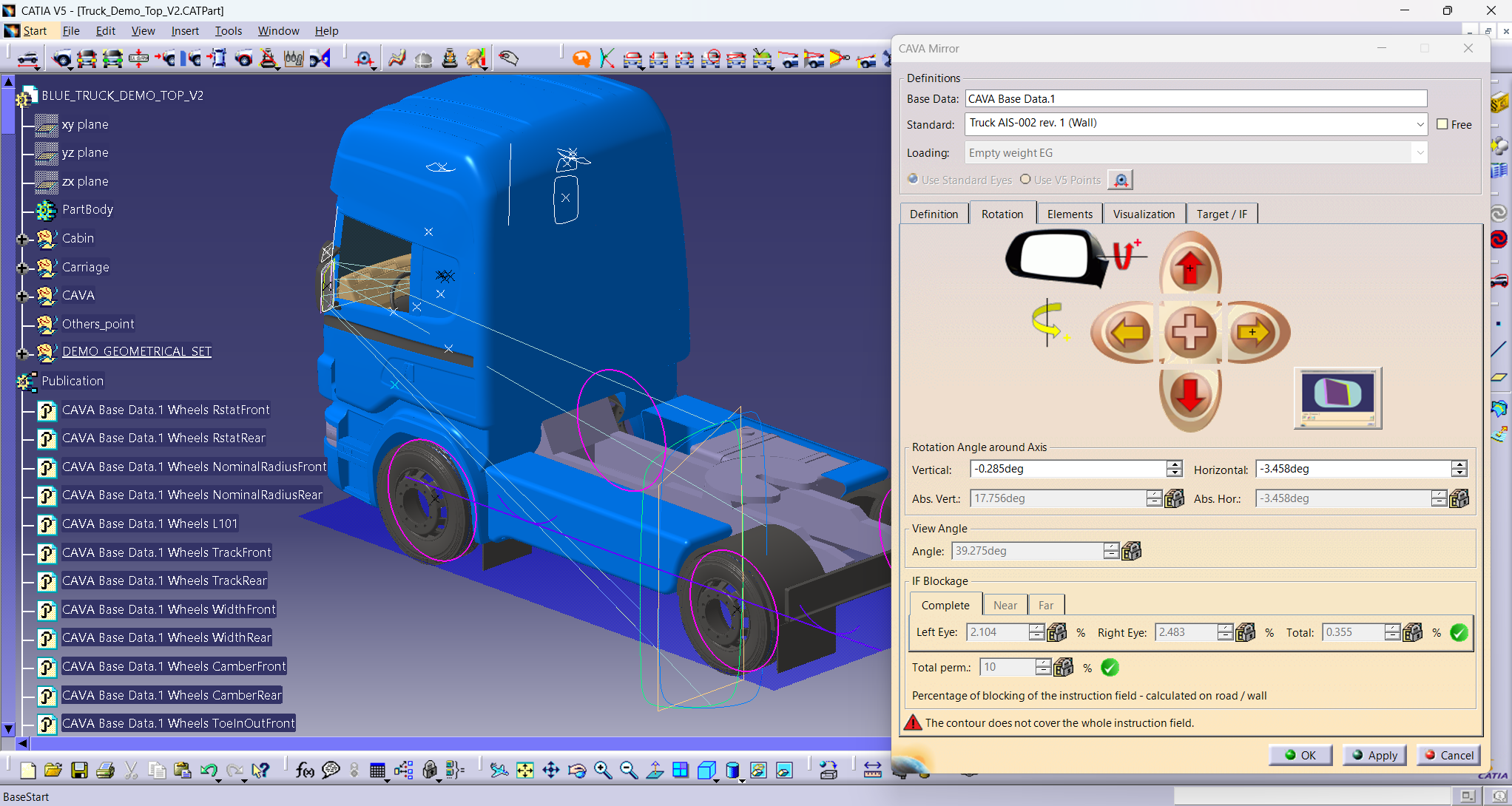
To initiate AIS 002 compliance checks in CAVA, three primary inputs are required:

  • Mirror Surface Type (Planar, Toroidal, etc.)
  • Rotation Point or Coordinates for mirror positioning
  • Mirror Contour defining the geometric shape and boundaries of the mirror

CAVA evaluates the mirror placement in relation to the vehicle’s geometry and simulates the driver’s ambinocular vision to check for field-of-vision compliance as per AIS 002. It also identifies any geometric element blockages that could impair mirror effectiveness.

The software provides clear visual feedback: a green tick signifies that the mirror configuration passes AIS 002 visibility and installation standards, while a red exclamation mark indicates a failure needing design modification.


Benefits of Integrating CAVA in Truck Mirror Homologation

  • Streamlined Compliance: Automates mirror validation steps, minimizing manual measurement errors and expediting approval.
  • Seamless CAD Integration: CAVA works inside CATIA V5 and 3DEXPERIENCE, avoiding the need for standalone tools or additional software installations.
  • Supports Multiple Mirror Types: Enables homologation analysis across a broad spectrum of mirror geometries critical to truck regulations.
  • Accurate Vision Modelling: Incorporates the driver’s ocular points and R point, ensuring realistic visibility simulations.
  • Enhanced Safety Assurance: Assesses complex blind-spot “wall zones” coverage to adhere closely to AIS 002 (Wall) provisions.

Conclusion

AIS 002 Rev. 1 sets comprehensive standards for truck mirrors to maximize driver visibility and safety. Virtual homologation with CAVA transforms this traditionally cumbersome process into a more efficient, integrated, and precise digital workflow. By enabling advanced mirror type analysis, position verification, and geometric blockage checks within the familiar CAD environment, CAVA empowers OEMs to confidently meet AIS 002’s rigorous requirements while reducing time-to-market and resource expenditure. Virtual homologation with CAVA is the future of regulatory compliance for truck mirror systems.


Exploring the Future: Virtual Twin Experience with 3DEXPERIENCE DELMIA

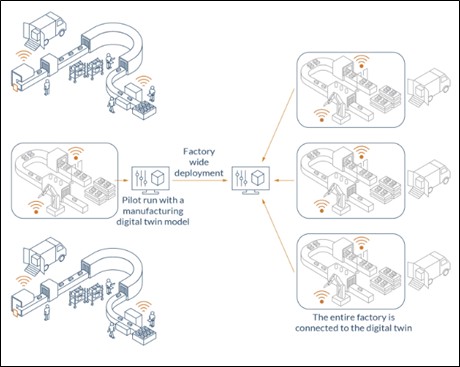
Companies are always looking for new ways to improve decision-making and streamline operations in the fast-paced world of today. One of the most exciting developments in this field is the idea of the Virtual Twin, and DELMIA’s 3DEXPERIENCE platform offers a potent implementation of this technology. Let’s explore how the Virtual Twin Experience in 3DEXPERIENCE DELMIA is changing industries and influencing the direction of digital transformation. The cloud-based Virtual Twin Experience is an executable virtual model of a physical system that is updated using insights and experiences gleaned from real-world processes.

The complete realization of the advantages that come from the convergence of the virtual and real worlds is the achievement of this closed-loop capability.


A Virtual Twin: What is it?

A virtual twin, often called a digital twin, is an electronic duplicate of a real system, process, or object. Users can visualize, evaluate, and optimize their assets in a virtual environment thanks to this virtual model, which replicates real-world activities and circumstances. With the use of sensor data, past performance, and statistical analysis, it offers a thorough, live depiction of its physical equivalent. Four distinct elements make up a virtual twin experience: performance, modeling, collaboration, and optimization.

  • Collaboration- It is the process by which many people in an organization come together to determine the needs, desires, and project objectives while utilizing the principles of lean manufacturing.
  • Modeling-The process of Modeling is where digitalization begins. To accurately depict machinery, procedures, and processes, physical systems—and frequently individuals as well—must be shown. Here, accuracy is crucial and needs to be upheld throughout the duration of the project.
  • Optimization -The benefit of the Virtual Twin Experience is Optimization, which is the process of testing, trying, and testing again improvements to lower production bottlenecks and boost productivity. Planning modifications turn into genuine “what if” experiments at this point, iterating through several adjustments in real time, ranging from worker time and mobility analysis to equipment cycles.
  • Performance-The goal of actually putting the new processes and procedures that were developed in the virtual factory into practice is performance. A productive virtual twin experience reduces downtime and allows for quick, trouble-free production modifications. Then, real-time data is fed back to the twin by sensor-equipped apparatus to validate results and create a fresh baseline for the subsequent round of tests and enhancements.

Virtual Twin Experience in 3DEXPERIENCE Platform

Dassault Systèmes’ DELMIA brand incorporates Virtual Twin technology into its 3DEXPERIENCE platform. The reputation of this platform stems from its capacity to link many facets of the product lifecycle, ranging from engineering and design to production and operations. 3DEXPERIENCE DELMIA’s capabilities are improved using Virtual Twin technology, which provides a comprehensive perspective of systems and processes.


Key Features of the Virtual Twin Experience in 3DEXPERIENCE DELMIA

  • Improved Cooperation- By allowing several stakeholders to communicate with the Virtual Twin at once, DELMIA promotes cooperation. Collaborating in a shared virtual environment facilitates communication, troubleshooting, and process optimization for teams. By working together, we can make decisions more quickly and make sure that everyone is aware of the most recent facts.
  • Monitoring and simulating in real time- The Virtual Twin Experience’s real-time monitoring and simulation functions are among its best features. The Virtual Twin gives current data about the physical asset’s performance by establishing connections with Internet of Things sensors and data sources. This enables businesses to test modifications, forecast results, and simulate a range of scenarios without interfering with ongoing business activities.
  • Optimizing and Maintaining Predictively- Industry sectors that depend on complex machinery and equipment stand to gain greatly from predictive maintenance. By analyzing data from the actual inventory, DELMIA’s solution can forecast probable breakdowns before they happen thanks to the Virtual Twin. This proactive strategy minimizes maintenance costs, decreases downtime, and increases asset longevity.
  • Optimized Activities and Process Enhancement- DELMIA’s Virtual Twin facilitates the identification of inefficiencies and bottlenecks by modelling complete production processes. Before making changes in the real world, users can optimize workflows and resource allocation by testing process enhancements in a virtual environment. Significant cost reductions and improved operational efficiency result from this.
  • Customization and Personalization- There is a great deal of customisation and modification possible with the Virtual Twin Experience. The virtual model can be customized by users to match particular operational requirements, aesthetic preferences, or performance standards. Because of its flexibility, the Virtual Twin is guaranteed to meet the particular needs of any company.


Utilizations in All Sectors 3DEXPERIENCE DELMIA’s Virtual Twin Experience is adaptable and useful in a range of sectors:

  • Manufacturing: Improve quality control, cut down on downtime, and optimize manufacturing processes.
  • Aerospace and Defence: Increase safety, simplify maintenance, and simulate intricate systems.
  • Automobile: Evaluate car designs, improve efficiency, and streamline supply networks.
  • Energy and Utilities: Plan maintenance requirements, keep an eye on infrastructure, and maximize energy use.

Conclusion

The 3DEXPERIENCE Virtual Twin Experience is a game-changing technology that connects the digital and real worlds is called DELMIA. Organizations can make well-informed decisions, optimize operations, and spur innovation with the help of DELMIA’s Virtual Twin, which facilitates real-time insights, improves collaboration, and enables predictive maintenance.

The future of corporate operations will be greatly influenced by the incorporation of Virtual Twin technologies as industries continue to embrace digital transformation. Businesses are leading change rather than just responding to it thanks to DELMIA’s 3DEXPERIENCE platform. The Virtual Twin Experience is a potent instrument that has the potential to completely transform the way we interact with the world around us. It is more than just a window into the future.

ENOVIA Scalability on Windows: A Deep Dive into Performance Engineering

Product Lifecycle Management (PLM) is the backbone of modern manufacturing and design organizations. As projects become more complex, involving thousands of engineers, massive assemblies, and cross-department collaboration, the underlying PLM system must scale efficiently.

Dassault Systèmes’ ENOVIA PCS (Performance & Scalability) for Windows provides a structured approach to understanding how ENOVIA can handle enterprise-level scalability challenges. Let’s dive into the core insights.


Why Scalability in ENOVIA Matters

A non-scalable PLM system creates bottlenecks:

  • Users face slow responses while loading or saving large assemblies.
  • Databases crash due to connection overloads.
  • Servers fail under the weight of simultaneous operations.

To counter these, Dassault Systèmes emphasizes Performance & Scalability (PCS) testing. This testing ensures that ENOVIA infrastructure can handle workloads from hundreds — even thousands — of concurrent users.


🖥 ENOVIA Architecture – The Backbone


At its heart, ENOVIA follows a multi-tiered architecture:

  • Vault Server – Securely manages storage and retrieval of files.
    • Handles file descriptors and client requests.
    • Requires optimized thread pools for high concurrency.
  • Application Server – Acts as the engine of ENOVIA.
    • Hosts PCS services and manages user sessions.
    • Relies on Orbix configuration for efficient communication.
  • Database Server – The foundation for structured data.
    • For DB2: Supports up to 2000+ concurrent connections with optimized parameters.
    • For Oracle: Requires fine-tuned Processes and Sessions for stability.
  • Clients (CATIA/ENOVIA Users) – Engineers and designers interacting with the system.
    • Their interactions (logins, queries, design saves) generate the real-world load for PCS testing.

Prerequisites for High Performance

To make PCS testing meaningful, system configurations must be optimized:

  • Vault Server Tuning:
    • Set environment variables like IT_FD_STOP_LISTENING_POINT and IT_DAEMON_CONNECTION_LIMIT.
    • Configure VaultServer.properties for thread pool and DB connection pool management.
  • Application Server Tuning:
    • Increase Orbix connection timeouts (IT_DEFAULT_TIMEOUT, IT_CONNECTION_TIMEOUT).
    • Maintain consistent VaultClient.properties across both client and server.
  • Database Optimization:
    • DB2 → Parameters like MAXAPPLS, MAXAGENTS, MAX_COORDAGENTS set to 2000.
    • Oracle → PROCESSES and SESSIONS scaled to 1900+ concurrent connections.
  • Licensing: Increase concurrent DSLS/LUM licenses since each PCS test keeps user sessions active.

PCS Test Scenarios

Dassault Systèmes defines four real-world scenarios to test scalability:

  • Login → Query → Load
    • Simulates users logging in, querying for documents, and loading them into CATIA.
  • Visualization Mode → Design Mode
    • Switches large assemblies from lightweight visualization mode to full design mode.
    • Stresses cache management and design data conversion.
  • Login → Query → Load (Publication Exposed Assembly)
    • Handles publication-exposed Product Representations (PRC).
    • Tests how efficiently assemblies are queried and loaded under multi-user conditions.
  • Save to ENOVIA
    • Saves large assemblies from local disk into ENOVIA as Structure Exposed assemblies.
    • Requires Server UserExit (UE) for batch execution.
    • Highlights how save operations impact both vault and database under load.

Troubleshooting Common PCS Errors

  • During testing, typical errors may occur:
    • Connection Error → Check CATSettings, Java path, or licensing.
    • Load Document Error → Verify database references & VaultClient configuration.
    • Session Creation Failed → Usually due to insufficient licenses.
  • Trace Logs are vital for root cause analysis:
    • Client Traces → VaultClient ENOVIALCATraces –k
    • Server Traces → ServerPlugin PsPlugin PluginHandler logs
    • Vault Traces → Enable VaultServer_Trace = ON to capture ENOVIAVaultServer.log
    • Orbix Traces → Run with -u –t –a flags for connection management insights

Real Test Results

From Dassault’s official PCS test environment:

  • Hardware Setup:
    • 4 Application Servers (Windows 2008, 64 GB RAM each)
    • 1 Vault Server (Windows 2008, 4 GB RAM)
    • 19 Clients (Windows 7/XP, mix of 4 GB & 16 GB RAM)
  • Outcome:
    • Achieved 1970 persistent client connections.
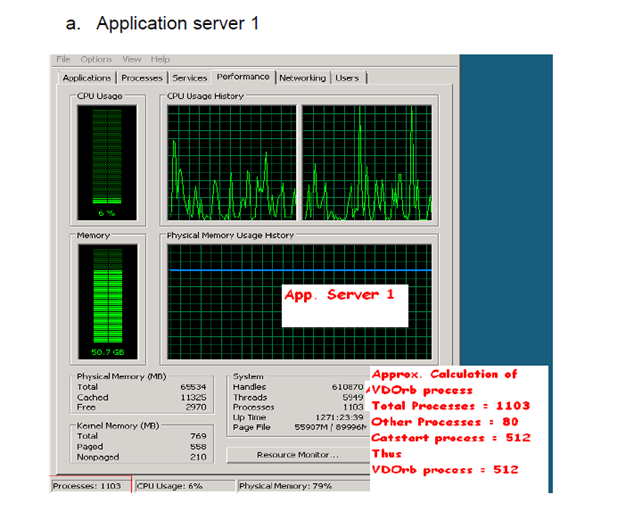
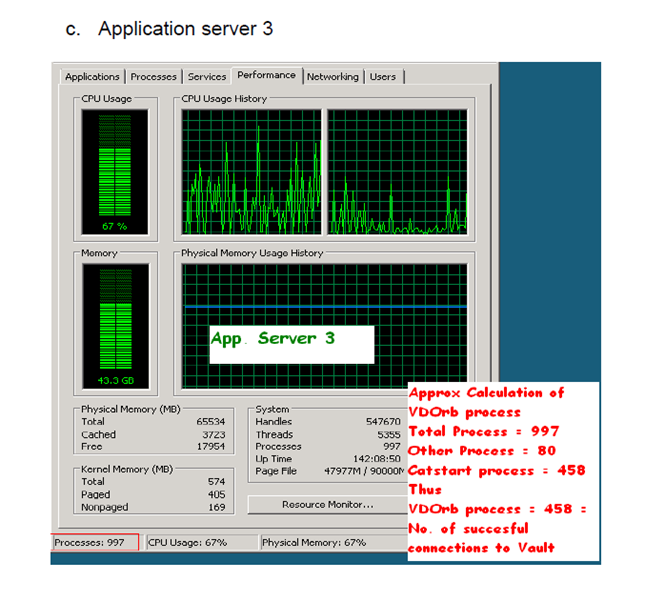
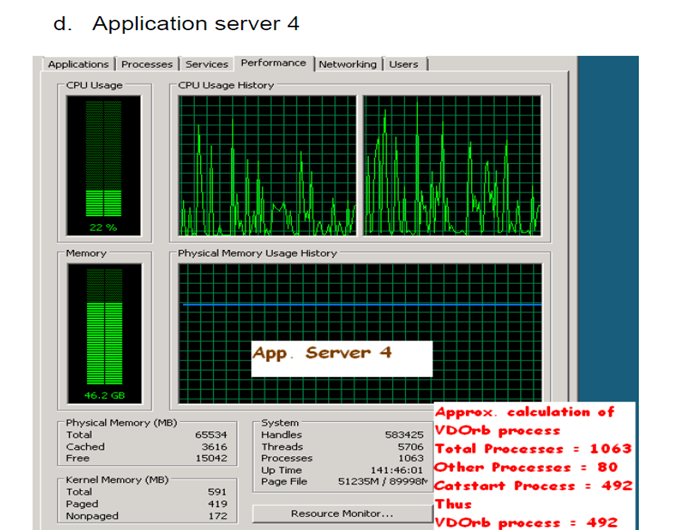
    • Each application server managed ~500 stable connections.
    • Load distribution:
      • 82 connections per 16 clients (4 GB)
      • 650 connections per 3 clients (16 GB)
  • Monitoring:
    • Task Manager showed stable memory usage across application servers.
    • No major crashes under peak load conditions.


Key Takeaways

  • PCS testing is essential for ensuring that ENOVIA environments can scale to thousands of users.
  • Proper tuning of Vault, Application, and Database servers makes a direct impact on scalability.
  • Batch simulation of real-world scenarios (login, query, load, save) provides confidence in production stability.
  • With optimized hardware and configurations, ENOVIA achieved nearly 2000 persistent user connections.

Boosting Performance in Large Assembly Patterns & Drafting Views with 3DEXPERIENCE CATIA

In today’s competitive engineering world, time is money. Designers and engineers working with large assemblies – whether in aerospace, automotive or industrial machinery – often face performance bottlenecks when generating repetitive patterns or creating 2D drafting views.

Dassault Systèmes’ 3DEXPERIENCE platform offers advanced CAD capabilities, but applying the right best practices can make the difference between a slow, resource-heavy process and a smooth, efficient workflow.

This blog explores key methods to enhance Assembly Pattern performance and Drafting View generation – with practical insights on when and why to use them.


Assembly Pattern Generation: How to Work Smarter with Repetitive Designs

Assembly patterns are widely used to duplicate standard components (bolts, rivets, seats, fasteners, or modular parts) across large products. However, handling thousands of instances can easily slow down the design system.

3DEXPERIENCE offers two methods for pattern creation:


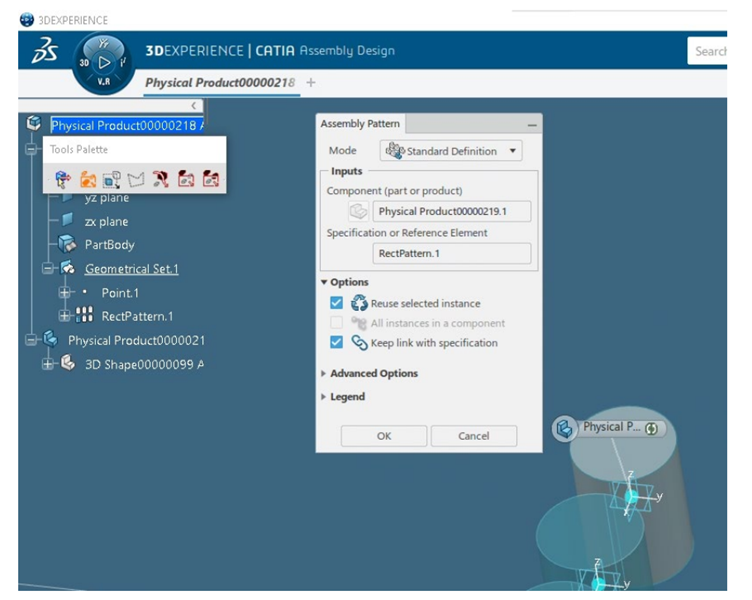
  1. Using “Keep Link with Specification” Option
  • How it works: Creates a live connection between the main part and all its patterned instances.
  • Benefit: If you modify the master part (e.g., bolt size), all instances update automatically.
  • Limitation: For very large assemblies (e.g., 1000+ parts), performance drops significantly.
  • Case Study Result:
    • Creation: ~35s
    • Update: ~17s
    • Save: ~120s
    • Modification (reduce from 1000 → 900): ~84s
    • Total Time: 256 seconds

  1. Without “Keep Link with Specification” Option
  • How it works: Instances are independent; modifying the pattern requires recreating instances.
  • Benefit: Faster performance in large assemblies where updates are rare.
  • Case Study Result:
    • Recreate pattern: ~12s
    • Update + Save: ~89s
    • Modification: ~108s
    • Total Time: 209 seconds (18% faster)

Best Practice Recommendation:

  • Use Keep Link ON → for assemblies that require frequent synchronized updates (like bolt patterns that may change size frequently).
  • Use Keep Link OFF → for very large assemblies where stability and speed are more important than live updates.

Drafting View Generation: Reducing the Wait Time

Once assemblies are complete, engineers must generate 2D drawings for manufacturing, inspection, or documentation. With thousands of parts, drafting view generation can be a time-consuming step – unless optimized.

  • Turn Off Shaded Background Mode
    • Effect: Removes unnecessary rendering of shaded views.
    • Impact: 67% faster (75s → 27s).
    • Use Case: Recommended when working with technical manufacturing drawings where hidden line views are sufficient.
  • Deactivate Clash Detection
    • Effect: Clash detection checks for interference between parts during view creation.
    • Impact: 36% faster drafting performance.
    • Use Case: Keep it OFF unless the drawing specifically requires clash validation.
  • Disable Automatic Updates
    • Effect: Creates lightweight previews first; full updates can be triggered manually or in batch mode.
    • Impact: ~33% time saving.
    • Use Case: Ideal for large assemblies where multiple views must be created quickly, and final updates can be done later.
  • Other Smart Settings
    • Occlusion Culling: Ignores parts that are not visible in the view.
    • Part Size Filter: Skips very small parts (like washers or pins) that don’t add value in drafting views.
    • Deactivate Exact Preview: Uses visualization instead of heavy geometry, improving speed.

These settings are powerful for industries like aerospace and automotive, where drawings often run into dozens of sheets and hundreds of views.


Practical Applications in Industry

  • Automotive BIW (Body-in-White):
    • Thousands of weld spots and fasteners patterned across the structure.
    • Using Keep Link OFF reduces lag while working on massive assemblies.
  • Aerospace (Aircraft Fuselage):
    • Repeated seat patterns and rivets along the fuselage.
    • Drafting optimizations cut drawing generation time for certification documents.
  • Heavy Machinery & Plant Engineering:
    • Assemblies with repetitive bolts, brackets, and structural members.
    • Smart drafting settings reduce time-to-documentation for field manuals.

Conclusion

Efficiency in CAD isn’t just about tools – it’s about using them wisely. Dassault Systèmes’ 3DEXPERIENCE platform gives engineers powerful options to handle massive assemblies, but performance depends on configuration choices:

  • For Assembly Patterns → Use Keep Link OFF for better speed in large assemblies and Keep Link ON only when synchronized updates are essential.
  • For Drafting Views → Switch OFF heavy options like Shaded Background, Clash Detection, and Auto Update to save up to 60–70% of time.

By applying these practices, companies can significantly reduce design-to-documentation cycles, enabling faster innovation, quicker manufacturing preparation, and more efficient collaboration across teams.


Reduce Errors and Repetitive Tasks with Assembly Symmetry & Pattern in 3DEXPERIENCE R2024x

In modern product development, design efficiency is not just about speed – it’s about precision, automation, and reusability. Dassault Systèmes 3DEXPERIENCE R2024x introduces advanced capabilities in Assembly Symmetry and Assembly Pattern that empower engineers to streamline repetitive design tasks, maintain associativity, and reduce errors.

These two functions – though often used together – serve distinct purposes in mechanical design. Let’s dive into how they work and why they matter.


Assembly Symmetry: Mirroring Made Smarter

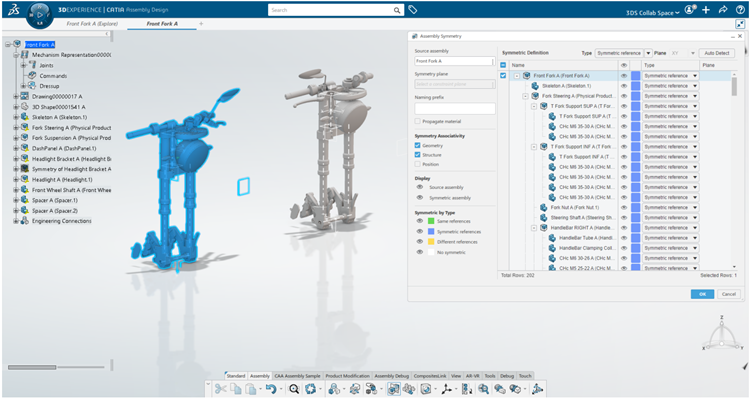
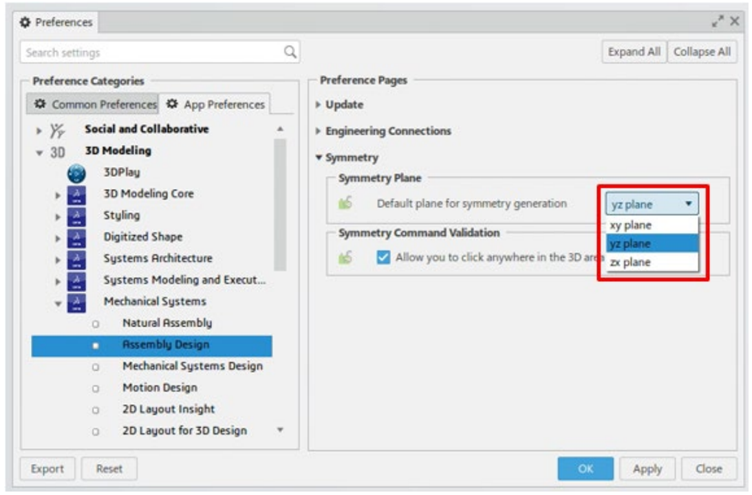
The Assembly Symmetry command allows designers to quickly generate symmetric product structures from an existing assembly. Instead of recreating mirrored components manually, the system leverages defined symmetry planes (by default YZ, but configurable to ZX or XY).

Key features include:

  • Symmetry of Root Products vs. Sub-Products – Designers can apply symmetry to the entire assembly (root) or selectively to sub-products.
  • Specification Types – Users can choose between Symmetric References, Same Reference, Different Reference, or No Symmetry depending on design needs.
  • Associativity Control – Geometry, structure, and position associativity ensure mirrored products remain linked to the original, automatically updating when changes occur.
  • Material & Naming Inheritance – Symmetric assemblies can inherit material properties and use customized prefixes for clarity.

Use Case Example: In automotive design, when creating left and right doors, Assembly Symmetry ensures that geometric modifications to one door propagate seamlessly to the other, saving time and reducing manual rework.


Assembly Pattern: Multiplying with Intelligence

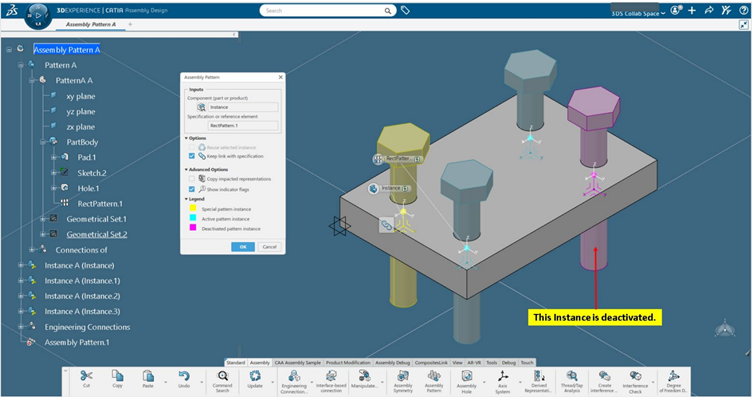
The Assembly Pattern command is designed for creating repeated instances of components within an assembly – such as bolts, rivets, or repetitive features like holes.

Supported pattern types include:

  • Rectangular Assembly Pattern
  • Circular Assembly Pattern
  • User-Defined Assembly Pattern
  • Axis System-Based Pattern
  • Patterns derived from Part Design or Generative Shape Design
  • Highlights of Assembly Pattern:
  • Associativity Options – Patterned instances remain linked to the original, so any change updates all instances.
  • Constraint Management – Engineering connections can be reused or newly assigned across instances.
  • Advanced Impact Options – Users can choose whether only clashing impacts (intersections) or all impacts are copied.
  • Visualization Tools – Color-coded legends (yellow for reference, cyan for active instances, magenta for deactivated ones) enhance clarity.

Use Case Example: In aerospace design, when placing multiple fasteners along a fuselage panel, Assembly Pattern ensures all instances follow a consistent axis system and update automatically if the base geometry changes.


Why These Functions Matter

  • Minimize repetitive manual work
  • Enhance collaboration through consistent updates
  • Reduce error risks in complex assemblies
  • Speed up design cycles in automotive, aerospace, and manufacturing industries
  • Help engineers focus on innovation rather than repetitive modeling


Conclusion

With Assembly Symmetry and Assembly Pattern, the 3DEXPERIENCE platform equips designers with automation tools that bridge creativity and efficiency. Whether mirroring large assemblies or multiplying components with precision, these features ensure that product development remains agile, reliable, and future-ready.


Subscribe to our newsletter

Get all the latest information on Events, Sales and Offers.